Article
Content design for AI agents: your content is an interface

Summary:
When an AI agent queries your documentation directly, your content stops being a source that gets exported and becomes a system that gets queried. At that point the shape of your content is the shape of the interface: titles decide what the agent finds, metadata decides how it filters, and component boundaries decide what it reads as one idea. Content design for AI agents is therefore mostly content work, not integration work. Six practices cover most of it, and nearly all of them make the content better for human readers too.
What it means when your content becomes an interface
For most of its life, documentation has been exported. Someone publishes a PDF, a help site or a data feed, and whatever reads it works from that copy. Model Context Protocol (MCP), an open standard for connecting AI applications to external systems, changes the arrangement. An agent can ask your content system directly, at the moment somebody asks it a question.
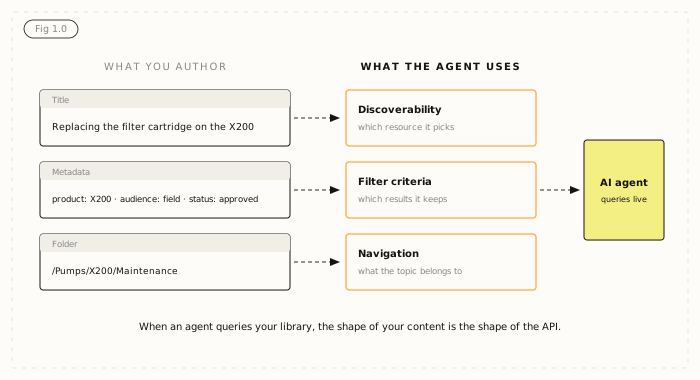
That has a consequence content teams tend to discover late. When an agent queries your library, the shape of your content is the shape of the API.
- Component titles become discoverability. An agent choosing between resources decides largely on what they are called.
- Metadata becomes filter criteria. Product, version, audience, status and locale are how an agent narrows a search.
- Folder structure becomes navigation. Where a topic lives tells the agent what it belongs to.
A person can make sense of a topic despite an unhelpful title, because they can see the page around it. An agent often has the title and very little else. None of this is a technical problem. It is a design problem, and it lands on the content team rather than the architect.
Three other things that change for content teams
Content as an interface is the first consequence of live agent access. Three more follow, and none of them is technical either.
Staleness becomes visible
This sounds like a downside and is actually the biggest win. With an export, out-of-date content produces a wrong answer that nobody traces back to you. With live access, content is read as it is right now, so the gap between what is approved and what is published becomes an operational fact rather than a background risk. You can finally see it, which means you can fix it.
Your permission model gets tested
Most documentation permission models have never really been exercised, because in practice everyone with a login could see everything and nobody minded. An agent querying on behalf of a user will find every gap in that model, quickly, and usually in front of someone senior.
Boundaries have to be explicit
Which content should an agent reach? Approved only, or drafts too? Internal and external, or external only? Every language, or just the requester's? These questions are not new. Live agent access is simply the first thing that forces you to answer them in configuration rather than in a policy document nobody reads.
How to design content for AI agents
Assume your content is governed and you know who can reach what. Whether an agent can actually use what it finds then comes down to six design practices.
1. Write titles that work without context
"Overview", "Introduction" and "Step 3" tell an agent nothing. "Replacing the filter cartridge on the X200" tells it the product, the task and whether this is the resource it wants. This is the highest-value change on the list, and it costs nothing but attention.
2. Let chunk boundaries follow meaning
Component-based content does well in retrieval because of boundaries, not sophistication. A component ends where the author decided the idea ended. A character-count chunker ends it at character 512, which is often between a warning and the step it applies to. If your content is already component-based, this is solved. If it is not, this is the argument for fixing it.
3. Make metadata mean something
Content type, product, version, audience, status and locale are each a filter the agent can apply. Each one that is missing is a question the agent has to guess at. Metadata that exists but is applied inconsistently is worse than none, because it produces confident wrong filtering: tag half your field procedures with an audience and the agent will quietly ignore the other half.
4. Keep relationships explicit
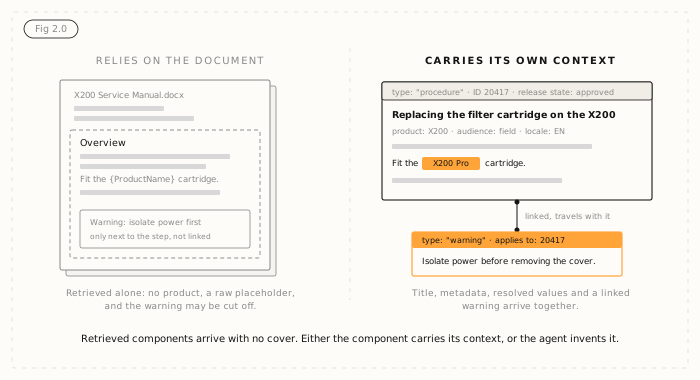
A warning that applies to a procedure should be linked to it, not merely sitting next to it in a document. When content is retrieved component by component, adjacency does not survive the trip. Linkage does.
5. Stop relying on the document as a container
In a document, context comes from position. Readers know a section is about the X200 because the cover says so. Retrieved components arrive with no cover. Either the component carries its own context, or its metadata does, or the agent makes it up.
6. Resolve variables before content leaves
Content full of unresolved placeholders is content an agent will read literally and repeat back to a customer, curly brackets and all. Whatever the mechanism, what the agent sees should be the resolved text a reader would see.
A test you can run this week
You do not need an agent connected to find out how your content would behave as an interface. Pick one product and one audience, then try three checks.
- Read twenty topic titles with nothing else on screen. Count how many tell you the product and the task.
- Pick one metadata field, such as audience or product, and check how consistently it is applied across that slice.
- Find three warnings and check whether each is linked to the procedure it governs or just placed near it.
The results tell you where the content work is, and they apply whether you plan live access, a retrieval pipeline or both. If you already run retrieval, the same fixes improve it, as we cover in structured content for AI and in our guide to documentation AI agents can use. Content that holds up this way also keeps its value as tools change, which is the point of future-proofing content for an AI stack.
Where Author-it fits
Most of these practices describe how a component content management system already stores content. In Author-it, a procedure is an object and a warning is an object, both held in one relational library. Each has a stable identifier, a folder path, a template type, resolved variables and a release state. Authors work in a word-processor-style editor, so none of this means learning XML.
There are two ways for AI to reach that library, and they behave differently on purpose. Author-it's MCP server, standard on Author-it Cloud since 2026.R3, is the live read. The connection carries the logged-in user's own permissions, so an agent sees what that person can see, including a draft if they can open it, and each item comes back with its release state attached so the agent can tell a draft from approved content. If you want an assistant limited to approved content, you set that rule in the AI client. It has been built and tested with Claude. AION is the published output: structured JSON with the content hierarchy, template type, resolved variable values and stable IDs, for loading into a pipeline or vector store. Because it is published, unapproved content cannot reach it.
Either way in, what makes the agent useful is the content work above. The protocol carries whatever you give it.

Content design FAQ
Q: What does "your content is an interface" mean?
A: When an AI agent queries a content system directly, rather than reading an exported copy, the structure of the content becomes the interface the agent uses. Titles decide what it finds, metadata decides how it filters and folder structure decides how it navigates.
Q: How do you design content for AI agents?
A: Write titles that make sense without context, end each component where the idea ends, apply metadata consistently, link related content such as warnings to the procedures they govern, make each component carry its own context, and resolve variables before content leaves the system.
Q: What is MCP and why does it matter to content teams?
A: Model Context Protocol is an open standard for connecting AI applications to external systems. It lets an agent query your content system directly at the moment of a question, so the current state and structure of your content, not an old export, decide what the agent gets.
Q: Why do titles matter so much for AI agents?
A: An agent choosing between resources often has the title and little else. A title like "Overview" tells it nothing, while "Replacing the filter cartridge on the X200" tells it the product and the task. Fixing titles is the cheapest high-value change a content team can make.
Q: Is MCP a replacement for RAG?
A: No. Retrieval-augmented generation works on a copy and is strong at semantic search across large bodies of content. MCP reads the source live. Most organisations use retrieval for breadth and live access when the answer has to be current or has to respect who is asking.
Q: Can an AI agent read draft content through Author-it's MCP server?
A: Yes, if the person it is acting for can read that draft in Author-it. The connection carries the logged-in user's own permissions, and content comes back with its release state attached, so the agent can tell a draft from approved content. Restricting an assistant to approved content only is set in the AI client.
Q: What is the difference between AION and MCP?
A: AION is Author-it's structured JSON published output. Content must pass the release-state gate to be published, so unapproved content cannot reach AION output. MCP is a live read of the library with each user's own permissions. It is the same governed library, reached two different ways.
Q: Which AI clients work with Author-it's MCP server?
A: Claude. That is what Author-it's MCP server has been built and tested against. MCP is an open standard, and customer demand will decide which clients are supported next.
Published on:
Author:
October 28, 2026
Related Resources

Article
Content design for AI agents: your content is an interface
Once an AI agent can query your library, titles become search, metadata becomes filters and folders become navigation. Here is how to design for it.
Article
Author-it releases interactive AI grounding demonstration
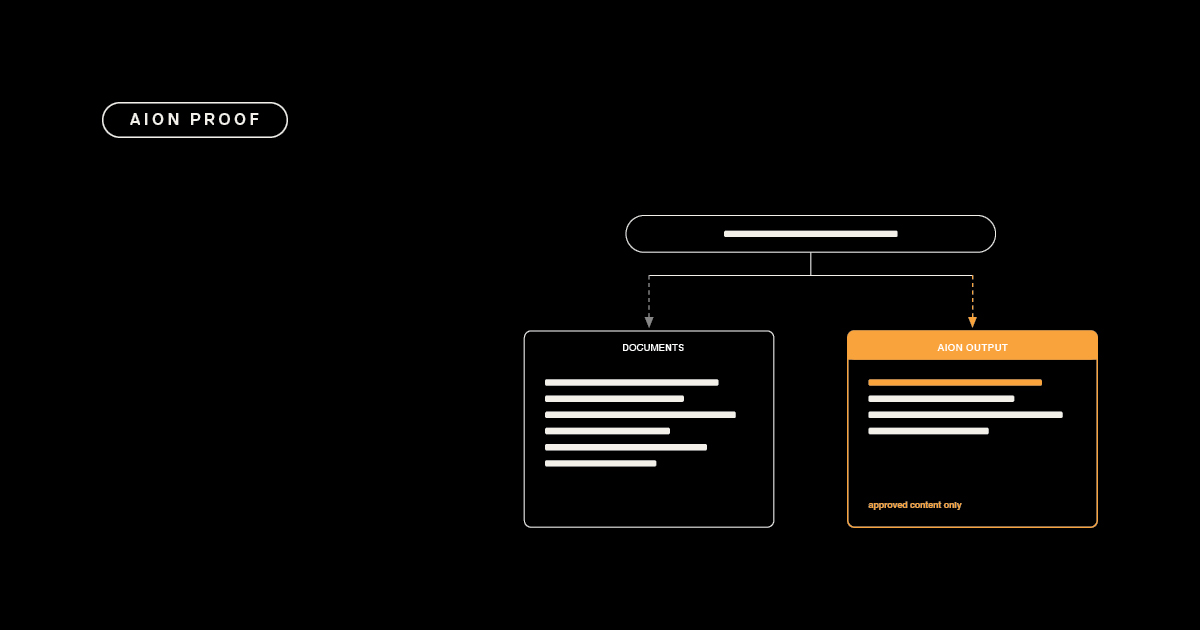
Same question, two sources: why ungoverned documents give an AI three answers and governed content gives it one, with its source attached.

Article
Field crew AI: when a wrong answer is a safety risk
Why safety-critical field operations can't run AI on ungoverned content - and what deterministic, traceable answers actually require.