Article
Connect an AI agent to your documentation: 7 questions

Summary:
Connecting an AI agent to your documentation is now mostly plumbing, because Model Context Protocol (MCP) gives every system the same connector. The risk sits behind the connector: an MCP server in front of a folder of files gives an AI agent live access to ungoverned content, drafts and superseded versions included. Before anyone connects anything, answer seven questions: what the agent can reach, whether it can tell a draft from approved content, whose permissions apply, what comes back with each answer, whether it can change anything, what is logged, and who fixes it when it is wrong. Each one is cheaper to answer before the pilot than after it.
The protocol is the easy part
Model Context Protocol is an open standard for connecting AI applications to external systems. A system exposes what it can do through an MCP server, an AI application connects to it as a client, and the agent queries the source directly at the moment of the question instead of working from an exported copy.
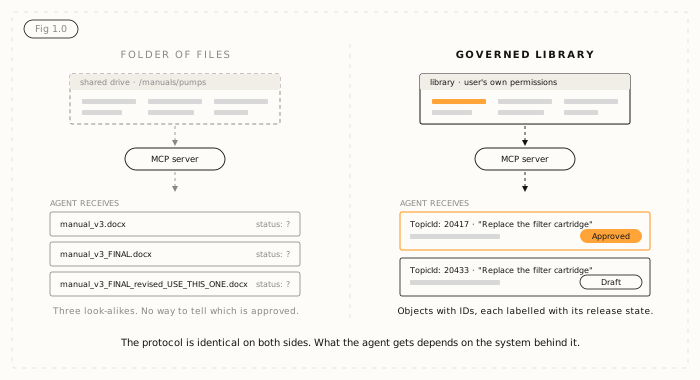
What MCP does not do is decide whether the answer is any good. It is a transport. It has no permission model of its own, no idea what "approved" means, and no opinion about the file called manual_v3_FINAL_revised_USE_THIS_ONE.docx.
That is why an MCP server in front of a folder of files is worse than a stale export, not better. With an export, at least somebody decided what went in. With an unmanaged live connection, whatever is in the folder is what the agent reads.
So the useful question is not "should we expose our documentation over MCP?" It is "is our documentation in a state where exposing it would be safe?" The seven questions below are how you find out. They work against any system, including ours.
1. What exactly can the agent reach?
Not "the documentation". Which content objects, in which states, in which folders, in which languages, for which audiences. If nobody can answer precisely, the scope is everything, because that is the default.
A good answer is a short list someone can check: one product line, the external audience, English and German, nothing from the archive. A bad answer is a wave in the direction of a shared drive.
2. Can it reach unapproved content, and can it tell?
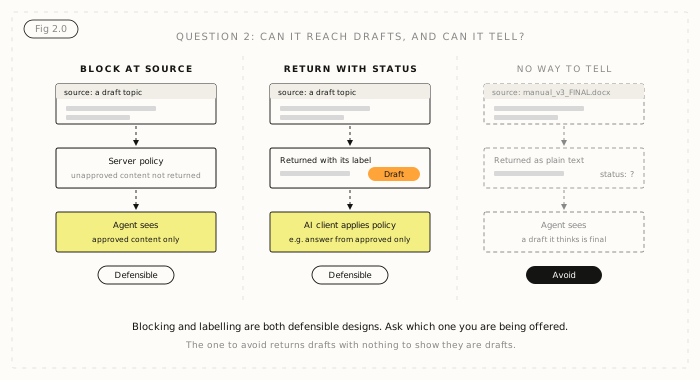
This is where most conversations about agent access go wrong, because people assume there is one right answer. There are two defensible designs, and you should know which one you are getting.
- Block at the source. The system never returns unapproved content to the agent.
- Return with status. The system returns what the requesting user is allowed to read, with its release state attached, and the AI client applies the policy, for example "answer only from approved content".
Both can work. Returning with status is often more useful to a documentation team, because "which manuals are still in draft?" is a real question someone will ask. It also means the client-side rule has to be configured on purpose, and somebody has to own it.
What does not work is the third design, the one a scraped document set gives you by default: drafts returned with no way to tell they are drafts. The agent presents a working copy and an approved procedure with equal confidence, and nobody sees the difference until a customer does. Ask which of the three you are being offered.
3. Whose permissions apply?
There are three possible answers. The requesting user's own permissions, which is the strongest: the agent sees exactly what that person could open, and nothing more. A service account's, which is common and means every user of the assistant effectively inherits the service account's access. Or none, which means the content is open to anyone who can reach the endpoint.
All three can be defensible for some content. Only one of them is usually what people assume is happening. Get the answer in writing, then test it: connect as a user with restricted access and ask for something they should not be able to see.
Expect this question to find gaps. Most documentation permission models have never really been tested, because everyone with a login could see everything and nobody minded. An agent will find those gaps quickly, and usually in front of someone senior.
4. What does the agent get back?
Content only, or content plus metadata? Does each response carry a stable identifier, a version, a last-modified date, a source path and a status? Without these, attribution is guesswork and the agent will cite "the documentation", which satisfies nobody in an incident review.
Granularity matters as much as metadata. A 200-page manual returned as one resource is not much use to an agent, and neither is a directory of PDFs. Content that is addressable as components, where a procedure is an object with its own ID, is what lets an answer be traced to the thing that said it. It is also the difference behind most of the reasons AI gives wrong answers about your products.
5. Can the agent change anything?
MCP separates resources, which an AI can read, from tools, which are actions the model decides to call. Some servers offer tools that write. If the server exposes anything that modifies content, treat it as a separate project with its own approvals, not a feature that comes along for the ride.
It is entirely reasonable to start read-only and stay read-only for a long time. Reading is where the value is for most documentation teams anyway.
6. What is logged?
You want a record of what was asked, what was returned, for whom and when. It matters for tuning, because the log is where you find the content the agent could not find and the content it found but should not have.
It matters far more the first time someone asks why the agent gave a particular answer. "It read topic 20417, which was approved on 3 October" ends that meeting. "We think it was the installation guide" starts a longer one.
7. What happens when it is wrong?
Every one of these projects has a first bad answer. Decide now who owns the correction path: how a user reports a problem, how the report reaches whoever owns the content, and how quickly the fix reaches the agent.
With live access, that last part should be immediate, because the agent reads the source rather than an index built last week. That is a real advantage over retrieval-augmented generation over a copy, which keeps serving a withdrawn procedure until the next ingestion. Most organisations end up using both, retrieval for breadth and live access for answers that have to be current.
What your answers tell you
If you can answer all seven precisely, you are ready to connect one AI client to a narrow slice of content, with a small group of real users, and learn from it. Widen one thing at a time after that: content, then audiences, then clients.
If you cannot, the gap is almost always content work rather than integration work. Three properties decide it: governance that knows approved from unapproved, structure that makes content addressable below document level, and stable identifiers so a citation still resolves next month. A protocol does not add any of them. If you are assessing platforms with this in mind, our CCMS evaluation guide and CCMS evaluation checklist cover the same ground from the buying side.
How Author-it answers the seven
This section is about Author-it. Everything above applies whatever system you use, and we would rather you asked us these questions than skipped them.
Author-it's MCP server shipped in 2026.R3 and is standard on Author-it Cloud. It has been tested with Claude. Here is how it answers each question.
- Reach: the agent reaches what the connected user can reach in the library, and nothing wider.
- Drafts: Author-it returns with status. If the user can read a draft, so can the agent, and the content arrives labelled with its release state, so the agent can tell a draft from approved content. Restricting an assistant to approved content only is a rule you set in the AI client.
- Permissions: the logged-in user's own, not a shared service account. The access model you already built is the one the agent works under.
- What comes back: content as discrete objects with stable identifiers and their properties, including where each sits and its release state. The full field list is in the 2026.R3 release notes.
- Changes: reading is the focus. Actions that change content are built individually rather than exposed by default.
- Logging and corrections: the log sits with your AI client and the correction path with your team. What the library adds is that a fix made in Author-it is what the agent reads next, because there is no copy to re-index.
AION, Author-it's structured JSON publishing output, is the other route to the same library: it is a published output, so content must pass the release-state gate to reach it, while MCP is a live read under the user's own permissions. See what AION output looks like, or read more about how Author-it works with AI.

AI agent access FAQ
Q: How do I connect an AI agent to my documentation?
A: Most teams now do it through Model Context Protocol (MCP): the documentation system exposes an MCP server and the AI application connects to it as a client. The connection is the easy part. Before connecting, decide what the agent can reach, whether it can tell drafts from approved content, whose permissions apply, what metadata comes back, whether it can change anything, what is logged and who fixes wrong answers.
Q: Is it safe to give an AI agent access to documentation?
A: It is as safe as the system behind the connection. MCP is a transport with no permission model or approval logic of its own, so an MCP server in front of a folder of files gives an agent live access to ungoverned content. Safety comes from the source system: governance that knows approved from unapproved, per-user permissions, component-level structure and stable identifiers.
Q: Should an AI agent be able to see draft documentation?
A: There are two defensible designs. A system can block unapproved content at the source, or it can return content with its release state attached and let the AI client apply the policy, such as answering only from approved content. The design to avoid is one that returns drafts with no way to tell they are drafts, which is what a scraped document set does.
Q: Whose permissions should an AI agent use?
A: The requesting user's own permissions are the strongest option, because the agent sees exactly what that person could open and nothing more. Many implementations use a shared service account instead, which gives every user of the assistant the service account's access. Ask which model you are getting, then test it by connecting as a user with restricted access.
Q: What is the difference between MCP and RAG?
A: RAG retrieves from a copy: content is exported, chunked, embedded and stored, so it is only as fresh as the last ingestion. MCP lets an agent query the source system directly at the moment of the question, and the request can carry the user's identity. Most organisations use retrieval for breadth and live access for answers that must be current or permission-aware.
Q: Should an AI agent have write access to documentation?
A: Start read-only. Any MCP tool that modifies content is a separate project with separate approvals, and it is reasonable to stay read-only for a long time. For most documentation teams, the value of agent access is in reading.
Q: Does Author-it have an MCP server?
A: Yes. Author-it's MCP server shipped in 2026.R3 and is standard on Author-it Cloud. The connection carries the logged-in user's own permissions, content comes back with its release state attached so the agent can tell a draft from approved content, and it has been tested with Claude. Reading is the focus; actions that change content are built individually.
Published on:
Author:
October 22, 2026
Related Resources

Article
Connect an AI agent to your documentation: 7 questions
An MCP server in front of a folder of files gives an AI agent live access to ungoverned content. Seven questions to settle first.

Article
MCP vs RAG: why they are not competitors
RAG searches a copy of your content and MCP asks the source directly. They answer different questions, which is why most teams need both.
Article
Field crew AI: when a wrong answer is a safety risk
Why safety-critical field operations can't run AI on ungoverned content - and what deterministic, traceable answers actually require.