Guide
Claude and MCP for technical writers: AI authoring guide

Summary:
Technical writers can now ask Claude to find, check, change and create topics in a component content management system (CCMS), not just in a chat window. Author-it Cloud does this through Author-it MCP, a Model Context Protocol connection available to Author-it Cloud customers from 2026.R4. Claude works with your own permissions, asks before it changes anything, and every topic it imports is checked by Author-it first: if one check fails, nothing is imported. This page answers the common questions about AI-assisted authoring with MCP. The free 72-page AI-Assisted Authoring Guide covers 50 content jobs step by step, each with an example prompt.
What is AI-assisted authoring with MCP?
AI-assisted authoring means an AI assistant does real work inside your content system: searching it, checking topics against your rules, drafting new topics and changing existing ones. The Model Context Protocol (MCP) is the open standard that makes this possible. It gives an assistant a set of actions in another system, and the assistant picks the actions it needs from what you ask in plain language.
The difference from copy and paste is big. Without MCP, you paste a topic into a chat, get text back, and paste it into your editor. With MCP, Claude reads the live library, works across a whole book, keeps references intact, and imports changed topics itself after you approve them.
- Live content, not a copy pasted into a chat.
- Many topics in one job, in batches.
- Changes arrive as checked imports, with history kept.
Which AI assistant works with Author-it?
Claude is ready to use with Author-it today, in Claude on the web, Claude Code or Cowork. Other assistants, such as ChatGPT and Copilot, are coming officially soon, and because MCP is an open standard, any MCP-capable assistant can connect in principle.
Author-it MCP is available to Author-it Cloud customers from 2026.R4. For a limited time, MCP is included at no extra cost. This introductory period runs until the 2027.R1 release. MCP will become a paid feature after that, and we'll confirm pricing with 2027.R1. It isn't available for on-premises installations.
How do you connect Claude to Author-it Cloud?
You add Author-it as a custom connector in Claude. It takes a couple of minutes, and in many organisations an administrator adds the connector once for everyone.
- In Claude, add a custom connector.
- Name it, and enter the connector address: the address you use to log in to Author-it Cloud, followed by /aitapi/mcp. For example, https://gx2.author-it.com/aitapi/mcp. If you log in with single sign-on, start with your single sign-on address instead.
- Start the connection. Your browser opens the Author-it Cloud login page. Log in, and select the library if you're asked.
- The first time, check the assistant's name and the access it asks for, then select Allow Access.
If your administrator has already added the connector, go to Settings > Connectors in Claude, select the Author-it connector and connect it. If a connection fails, check that the connector address starts with the address you log in to Author-it Cloud with.
What can Claude do in an Author-it library?
Claude can find, check, change and create content, and run most of the translation cycle. It works with the permissions of the person who connected it, in the one library they logged in to.
| Claude can | Claude can't |
|---|---|
| Find objects by name, type, folder, release state, date changed or the words they contain | Publish a book. You publish in Author. |
| Read topics and export any object as Author-it XML | Create a translation job. You create jobs in Translations. |
| Check topics against your style guide and report what doesn't conform | Show where an object is used. Show Relationships in Author does this. |
| Change topics, or create new ones, and import them itself | Delete anything. You delete objects in Author. |
| Write other objects (index entries, images, hyperlinks, books, folders, variables, templates) as a file you import in Author | Reach another library, or folders you can't see. |
| Find, export and import translation jobs, and read a job's log | Import objects other than topics and returned translations itself. |
Three ways Claude's work reaches the library
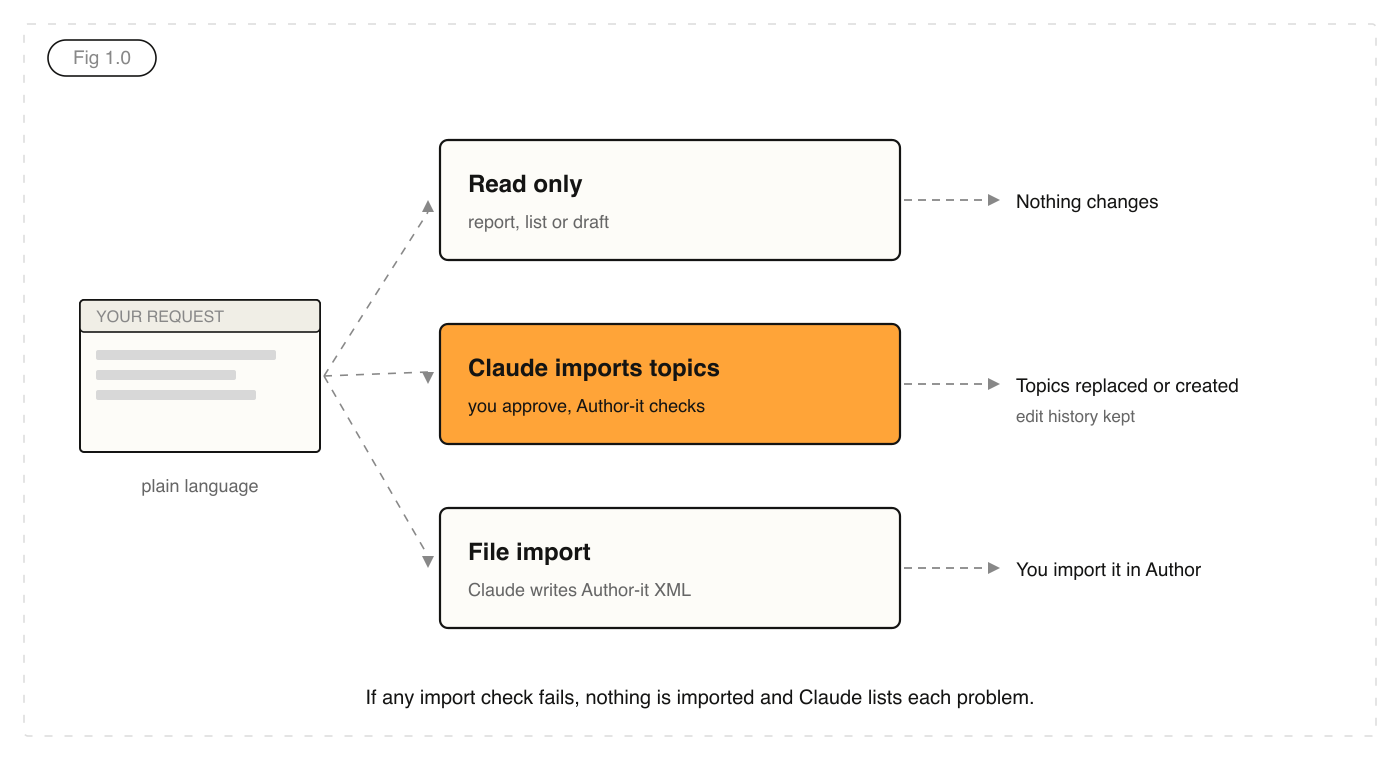
Every job takes one of three paths. Read only: Claude reads the library and gives you a report, a list or a draft, and nothing changes. Assistant import: Claude changes or creates topics and imports them itself, after you approve. File import: for anything other than a topic, Claude writes an Author-it XML file and you import it in Author.
Limits worth planning around
Each request to get topics or export objects carries up to 25 objects, so a 200-topic book takes at least eight requests. Very large files come back as a download link, and large topic files go up through an upload link. A search with no criteria could return the whole library, so Claude checks with you before it runs one.
Is it safe to let an AI assistant edit your CCMS?
It is when the system is built for it. Four controls decide what a connected assistant can do in Author-it Cloud, and none of them depend on the assistant behaving well.
- You log in. Claude never sees your password, and single sign-on works as normal.
- You allow access. The first connection shows a permission page with the assistant's name and the access it wants.
- Access follows your permissions. Claude works as you, in one library, and only sees folders you can see.
- You can remove access. Settings > Connected apps lists every assistant you've allowed, with a Revoke button.
What Author-it checks before an import
Before Claude's import starts, Author-it Cloud checks the whole file: that it's valid Author-it XML, that the topics come from the same library, that every object they refer to exists, that nobody else is editing them, and that you have permission to change or create each one. If any check fails, nothing is imported, and Claude tells you each problem. Every replaced topic keeps its previous version in its edit history.
The real risks, and how to handle them
An AI assistant writes fluently and can be confidently wrong. The guide names the mistakes to guard against: replacing the wrong object by reusing its identifier (GUID), typing out an embedded topic or variable as plain text so it stops updating, inventing an identifier, and making tidy-up changes nobody asked for. The fixes are simple habits: change as little as possible, keep a backup export, test on one object first, and compare the result with the original before importing the rest.

Two more risks matter to content teams. Prompt injection is an instruction hidden in content the assistant reads, such as a support ticket or a supplier's file. Keep untrusted content away from jobs that change the library, and approve every change. Confidential content goes to the assistant's provider, so use the plan your organisation has approved and keep personal data out of requests.
How do you write a prompt Claude gets right first time?
A reliable request answers six questions, so Claude doesn't have to guess any of them. A good test: would a capable colleague who has never seen your library know exactly what to do from it?
- The goal: what the result is for, and who reads it.
- The sources: named topics, a book, a search or a document.
- The scope: exactly which objects, and what to leave alone.
- The rules: your style guide, templates and terminology, each with the reason behind it.
- The output: a table, a list of object codes, an XML file or a draft.
- The test: how you'll judge the result, so Claude can check its own work first.
"Using the rules for short descriptions in our style guide, which is the Style Guide book in this library, propose a short description for each topic in the Installation Guide book that has none. The descriptions appear in search results, for administrators installing the product for the first time. Leave every other topic alone. Give me a table with the object code, the title, and your proposal, and name the rule each proposal follows. Before you answer, check each proposal against the rules, and tell me where you aren't sure."
Ask for a plan before Claude acts
For any job that changes content, ask Claude to list the objects it will work on and what it will do to each, then wait for your approval. A wrong approach costs one message to correct before the job starts, and many objects to repair after an import.
Split big jobs into batches
An assistant is most accurate with little in front of it. Get one object right first, then work in batches of 10 to 25 and check a sample of each batch. When a conversation gets long, ask for a short summary of the job and start a fresh one.
Keep your rules in the library
Claude can read your library but not the decisions behind it. Put your style guide, terminology, template descriptions and model topics in one place it can read for itself, such as topics in your Author-it library. Every request then uses the current version, and a rule change reaches every job.
What content jobs can Claude do in Author-it?
The guide covers 50 jobs in seven groups. Here's what each group does, with an example prompt from the guide. The full guide gives prerequisites, steps and checks for every job.

Planning and research (read only)
Find an existing topic before writing a new one, find every topic a product change affects, find topics stuck in review or gone stale, explore an unfamiliar book, and build a content inventory for an audit or migration.
"Here is the release note for the new export options. Search for topics that mention the Export dialog box or the Include images option. Read each one, and list the topics that describe the old behaviour, with the object code and the sentence that needs changing."
Quality review (read only)
Check topics against a style guide, check topic structure against content guidelines (your own or a standard such as DITA), check titles and terminology, find writing that raises translation costs, check documented labels against the product, and compare a translation with its source. These are the safest first jobs, and their reports become the work list for update jobs.
"Read the topics in the User Guide book and find what will raise translation cost: the same instruction written in different ways, long or complex sentences, inconsistent terms, and text typed in many topics that could be one shared topic. Group the findings by kind, with object codes and a suggested fix for each."
Content updates
Apply style guide formatting, move topics onto the right template, split or combine topics, update topics for a renamed feature, write short descriptions, add search keywords and metadata, rewrite in plain language, fix accessibility problems, turn repeated text into shared content, prepare topics for chatbots and AI search, and remove outdated release references.
"Read the procedures in this book. Group the steps and paragraphs that say the same thing, even in different words. For each group, propose one wording that reads correctly in every topic, and list the topics it appears in."
Content creation
Draft topics from subject matter expert notes, convert a document into topics, draft policies and procedures that reuse approved clauses, create reference tables from structured data, write troubleshooting topics from support tickets, create shared safety notices, build checklists, captions, cross-references, indexes and glossaries, create release variants, draft release notes from work items, assemble or outline a guide, and build a training course with an assessment.
"Using the attached notes from the developer and our style guide, propose the topics a reader needs: a title and a one-line purpose for each. Use topic 1234 as the model for a procedure and topic 1240 for an explanation."
Translation
Find translation jobs, export a job package for your provider, import returned translations as a draft or final import, read a job's log, plan the next translation update, and report volume and turnaround by language and provider. You still create translation jobs in Translations.
"Find the last French translation job for the User Guide, and list the topics in that book changed since the job was created, with who changed them."
Content for use outside Author-it, and library administration
Summarise content changes for a customer email, turn topics into presentation slides, answer a customer question only from released content, review recent changes across a library, and clean up folders and release states against your conventions.
How do you make AI workflows repeatable?
A one-off request gives a one-off result. When a job happens often, has to be consistent, or is done by more than one person, save what makes it work as reusable instructions. In Claude, a skill holds instructions with their reference files and tools, and a project holds reference material for a set of conversations.
Good reusable instructions have a short description, steps with branches, reference files read only when a step needs them, model examples, checklists, and approval points before anything changes the library. Build them from what actually went wrong, test them against cases where you already know the right answer, and re-test when the model changes. Good first candidates are style checks, short descriptions, glossary and index entries, and translation reports.
Let a tool do the exact work
An assistant is good at judgment and less reliable at exact work across a long file. For a change you make often, have Claude decide what to change and a tested tool make the change. You don't need to write code: an assistant that can write and run code, such as Claude Code, can build the tool for you. A safe tool makes one named change, leaves everything else exactly as it was, validates against the schema, and writes nothing if a check fails.
Which content jobs shouldn't you give an AI assistant?
Some jobs are faster and safer without one. If you already know exactly which objects change and how, change them in Author. If a name is held in a variable, change the variable: that's one edit and nothing to import. Exact counts need a tool, not a guess. And safety, legal and regulated content always needs review by a person qualified to approve it. An unreviewed result isn't finished.
What should you look for in a CCMS that works with MCP?
MCP servers are arriving across documentation tools, and they vary a lot. Read-only access is useful, but the value for content teams comes from safe writes. Ask any vendor these questions:
- Can the assistant write, or only read? If it writes, what does it change, and what can't it touch?
- Does the assistant act with each user's own permissions, or with a shared key?
- Is every change checked before it lands, and does a failed check stop the whole import?
- Is history kept, and is there a documented way to undo an assistant's change?
- Do references, reuse and variables survive an AI edit, or get flattened to plain text?
- Can the assistant run translation work as well as authoring?
- Can you revoke access centrally, and how fast does revocation take effect?
Structure is what makes the answers good. An assistant working in a library of typed, reusable topics with release states and permissions has guardrails built in. One working in a folder of documents doesn't.
Download the AI-Assisted Authoring Guide
The free PDF is 72 pages: connecting Claude, access and safe use, writing reliable requests, repeatable workflows, what an import does and how to undo one, and all 50 content jobs with prerequisites, steps and example prompts. It's written for Author-it Cloud customers on 2026.R4, and most of the advice on prompting and review applies to any AI assistant.
New to MCP? Start with Author-it MCP, then read MCP vs RAG: why they are not competitors and seven questions to ask before connecting an AI agent to your documentation. For how to structure content so AI gets it right, see content design for AI agents and AION.

AI Authoring FAQ
Q: What is an MCP server for a CCMS?
A: An MCP server for a CCMS is a Model Context Protocol connection that lets an AI assistant work inside a component content management system. The assistant gets a set of actions, such as searching topics, reading them and importing changes, and picks the ones it needs from a plain-language request. In Author-it Cloud this is Author-it MCP, which is ready for Claude today, with other assistants such as ChatGPT and Copilot coming soon.
Q: Which CCMS works with Claude through MCP?
A: Author-it Cloud works with Claude through Author-it MCP, available to Author-it Cloud customers from 2026.R4. Claude can find, check, change and create topics in an Author-it library and run most of the translation cycle, with each user's own permissions and an approval step before any change.
Q: Can Claude edit topics in Author-it?
A: Yes. Claude can change existing topics and create new ones, and import them itself after you approve the change. Before the import starts, Author-it Cloud checks the whole file, and if any check fails nothing is imported. For other objects, such as index entries, images, books or variables, Claude writes an Author-it XML file that you import in Author.
Q: Is Author-it MCP included in my Author-it subscription?
A: Author-it MCP is available to Author-it Cloud customers from 2026.R4. For a limited time, MCP is included at no extra cost. This introductory period runs until the 2027.R1 release. MCP will become a paid feature after that, and we'll confirm pricing with 2027.R1. Talk to your Account Manager if you have any questions.
Q: Does Author-it MCP work with on-premises Author-it?
A: No. Author-it MCP is available to Author-it Cloud customers only, from 2026.R4. On-premises installations don't include it.
Q: Can Claude publish or delete content in Author-it?
A: No. Claude can't publish a book, delete an object or create a translation job. You publish and delete in Author, and create translation jobs in Translations. Claude also can't reach another library or any folder you don't have permission to see.
Q: How do I undo a change Claude made in Author-it?
A: Import the backup export you saved before the change, either by asking Claude to import it or by importing it yourself in Author. If you didn't save one, restore each object's previous version from its edit history in Author. Then delete any object the bad import created, check each object, and fix the request before running it again.
Q: What makes a good AI prompt for technical writers?
A: A good prompt answers six questions: the goal and who the result is for, the sources to work from, the exact scope, the rules with the reason behind each, the output you want, and how you'll judge it. Ask for a plan before the assistant changes anything, tell it that it may say it doesn't know, and work in batches of 10 to 25 topics.
Q: Can Claude manage translation jobs in Author-it?
A: Yes. Claude can find translation jobs, list providers, export a job package for your translation service provider, import returned translations as a draft or final import, and read a job's log. It can't create a translation job: you create jobs in Translations.
Q: How many topics can Claude work on at once in Author-it?
A: Up to 25 objects in each request to get topics or export objects, so a 200-topic book takes at least eight requests. For accuracy, get one topic right first, then work in batches of 10 to 25 and check a sample of each batch.
Q: What is prompt injection, and does it affect content teams?
A: Prompt injection is an instruction hidden in content an AI assistant reads, such as a support ticket, an email or a supplier's file, which the assistant may follow. The risk is highest when one assistant can read outside content and also change your library. Connect only the tools a job needs, treat outside content as untrusted, and approve every change.
Q: Is content I give Claude used to train AI models?
A: That depends on your Claude plan and its settings, not on Author-it. Business and enterprise plans usually exclude content from training by contract, while personal plans may use it depending on a setting. Use the plan your organisation has approved and keep personal data out of requests.
Published on:
Author:
November 21, 2026
Jamie Simmonds
Documentation Manager
Related Resources

Guide
Claude and MCP for technical writers: AI authoring guide
How technical writers use Claude inside Author-it through MCP: setup, safe edits, reliable prompts and 50 content jobs, with a free 72-page PDF.

Article
Connect an AI agent to your documentation: 7 questions
An MCP server in front of a folder of files gives an AI agent live access to ungoverned content. Seven questions to settle first.

Article
MCP vs RAG: why they are not competitors
RAG searches a copy of your content and MCP asks the source directly. They answer different questions, which is why most teams need both.