Article
How to build a business case for replacing InDesign

Summary:
Most InDesign replacement cases fail in the finance meeting because they focus on the wrong things. Features, workflows, and content reuse percentages mean nothing to a CFO - time saved, money recovered, and risk avoided do. This guide gives you a framework to quantify what InDesign is actually costing your organisation, structure a single-slide ROI case, and answer the three objections finance always raises. Author-it customers in manufacturing and regulated industries typically see payback within 12-18 months - one global consumer products company reduced annual documentation costs by over $3M.
Why most InDesign replacement cases fail
If you have ever tried to get budget for a CCMS and walked out empty-handed, there is a good chance you walked in with the wrong argument.
Technical writers and documentation managers care about content reuse, single-source publishing, and structured authoring. Finance does not. They care about three things: how much is the current situation costing, how much will the new situation cost, and when does the investment pay back.
The moment you show a finance decision-maker a diagram of content components flowing to multiple outputs, you have lost them. Start with a number instead. Specifically, start with the number that represents what your current InDesign workflow is costing the business right now - in writer hours, in translation spend, in version errors, and in audit preparation time. That number, once quantified honestly, is your business case.
This guide gives you the framework to build that case. It is deliberately structured as a pitch toolkit - something you can adapt into the actual slide or document you will present internally. Use the detailed comparison of InDesign versus purpose-built CCMS capabilities as supporting evidence, but keep the pitch itself focused on cost.
The four cost categories to quantify
These are the categories that appear in every InDesign environment we have encountered, and the ones finance can verify. For each one, there is a simple calculation formula. Run the numbers for your organisation and fill in the blanks.
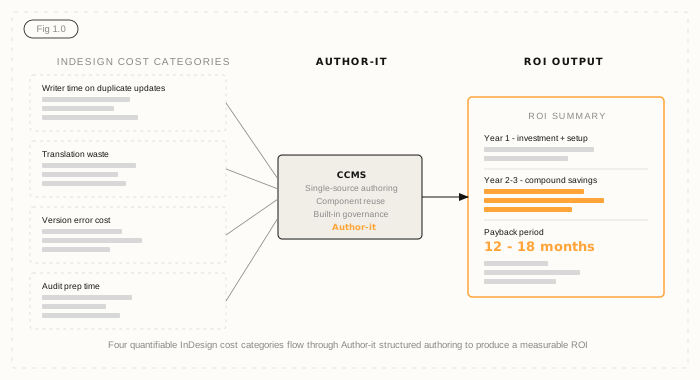
1. Writer time on duplicate updates
In an InDesign environment, when a product specification changes, that change does not flow automatically to every document it appears in. Writers update each file manually - or it does not get updated at all.
The formula: average update frequency per month x average number of files affected per update x average time per file update x writer hourly cost.
Example: if a product spec changes four times per month on average, affects six InDesign files each time, and each file takes 45 minutes to update correctly, that is 18 hours of writer time per month just on propagating a single change. At a fully loaded hourly cost of $60, that is $1,080 per month - $12,960 per year - for one product line. If you manage documentation across ten or more product lines, scale accordingly.
2. Translation waste
Translation agencies charge by the word, and in an InDesign environment, you pay for words that have not changed. When you export a document for translation, the agency receives the entire document - including every sentence that is identical to last quarter. You are paying to retranslate content you already paid to translate.
The formula: percentage of unchanged content in your last major translation batch x annual translation spend.
In structured content environments, only new or changed components are sent for translation. Organisations with 60-70% content reuse - which is typical after one to two years in a CCMS - typically cut translation spend by 60-90%. If your current annual translation budget is $200,000 and 65% of your content has not changed since the last translation cycle, you are spending approximately $130,000 on words you have already paid for.
For more detail on how structured authoring changes the translation cost model, see how manufacturers are reducing documentation costs through structured content.
3. Version error cost
This one is harder to calculate precisely, but it is often the most persuasive number in a regulated industry. When a wrong version of a procedure, specification, or safety instruction reaches the field - or a regulator - the consequences range from expensive to catastrophic.
The formula: estimated cost of a single version error event (recall, rework, regulatory response, liability exposure) x estimated annual frequency of version discrepancies reaching the field.
You do not need a precise number here - a reasonable estimate is enough. If a single incorrect procedure in the field costs $50,000 to remediate and your team knows this happens roughly twice a year in your current workflow, that is $100,000 in annual version error exposure. The right answer to finance is not a guarantee the CCMS will eliminate this entirely - it is that version control at the component level with a full audit trail makes this category of error structurally harder to make.
If version control in InDesign environments is a recognised pain point, this number will resonate with operations leadership even before it reaches finance.
4. Audit preparation time
ISO audits, regulatory submissions, and compliance reviews all require demonstrating that the right version of the right document was in front of the right people at the right time. In an InDesign environment, assembling that evidence is almost always a manual exercise - pulling emails, checking file modification timestamps, interviewing team members.
The formula: average hours spent preparing for a single regulatory audit x number of audits per year x fully loaded hourly cost of the people involved.
This is a number most documentation managers can estimate accurately. If an ISO audit preparation involves 40 hours of documentation team time across two people, and you go through three audits per year, that is 120 hours of audit prep at a loaded cost of $80 per hour - $9,600 per year. In a CCMS with built-in Review and Approve workflows and a full audit trail, the evidence is already assembled. Preparation time collapses.
How to structure the ROI slide
The finance meeting is not the place for nuance. You need one clear slide that answers three questions: what is it costing now, what will it cost to fix, and when does it pay back.
Structure it like this:
Column one - Current annual cost of the InDesign workflow: add up the four categories above. Use conservative estimates. If your honest calculation is $180,000 per year in quantifiable waste, do not inflate it. Finance will scrutinise every number, and a conservative estimate you can defend beats an optimistic one you cannot.
Column two - Year 1 investment: platform licensing plus implementation. Author-it implementations typically complete within 90 days, and the services team has completed migrations from InDesign, FrameMaker, Word, and SharePoint. Year 1 is the high-cost year - acknowledge that upfront.
Column three - Year 2-3 savings: this is where the case becomes compelling. Organisations with 60-70% content reuse see sustained savings across all four cost categories year-over-year. The translation savings alone often justify the platform cost within the first 18 months. Author-it customers in manufacturing typically reach payback within 12-18 months.
If you want to run the actual numbers for your environment rather than working from estimates, the Author-it ROI calculator is designed for exactly this - it outputs the same three-column structure against your specific cost inputs.
The three objections finance always raises
These come up in almost every budget conversation. Here are honest answers to each.
What about migration cost?
Migration is real work, and it is worth being direct about it. The cost depends on how much content you have, what state it is in, and how much information architecture work needs to happen before migration. The Author-it services team has done this from InDesign, FrameMaker, Word, SharePoint, and Confluence - most projects complete within 90 days. The honest framing for finance is that migration is a one-time cost, and it is largely offset in Year 1 by the savings that start accruing from day one of go-live.
How long until we see savings?
The fastest savings appear in translation costs, because the first translation cycle after go-live immediately excludes unchanged content. Writer time savings take a little longer as teams build content reuse habits and the component library grows. Version error savings are harder to measure but start immediately. Audit prep savings are visible at the first post-go-live audit. The compound effect of all four categories is what drives the 12-18 month payback.
What if the project fails?
Most CCMS implementations that fail do so for one of three reasons: poor information architecture design before migration, insufficient team training, or platform complexity that exceeds the team's technical capacity. Author-it's implementation is services-led from day one - not a software handoff. The IA design, content migration, and training are part of the engagement, not afterthoughts. That said, this is a fair question and finance is right to ask it. The honest answer is that a well-scoped implementation with a services team that has done it before is low-risk. An in-house build or a self-service platform migration is higher-risk.
Where to go from here
This article has focused on the InDesign-specific case because that is where most documentation teams we speak to are starting. If you want the broader argument for why structured content management matters beyond the cost case - including the case for AI-ready content output - the Author-it business case for a CCMS covers that ground in detail.
For teams ready to put actual numbers against their environment, the ROI calculator will get you to a defensible figure faster than working through the formulas above manually. It outputs the same structure your finance team expects to see.
If you are in manufacturing and this problem looks familiar at scale - multiple product lines, multiple markets, regulatory complexity - the Author-it manufacturing page has the context on how structured authoring applies specifically to that environment.

InDesign replacement business case FAQ
Q: How do I build a business case for replacing InDesign with a CCMS?
A: Build the case around quantifiable costs, not features. Calculate four categories: writer time lost to duplicate updates, translation spend on unchanged content, version error remediation costs, and audit preparation time. Add these up to produce a current annual cost figure. Compare that against the Year 1 platform and implementation cost, and model Year 2-3 savings using realistic content reuse rates. Most organisations find the numbers justify the switch before they have finished the calculation.
Q: What is the ROI of replacing InDesign for technical documentation?
A: Author-it customers in regulated industries typically see payback within 12-18 months. The ROI comes from four compounding sources: reduced writer time on duplicate updates, lower translation costs from content reuse (60-90% savings are common), reduced version error exposure, and faster audit preparation. A global consumer products manufacturer using Author-it achieved over $3M in annual savings with 60-70% content reuse and translation costs cut by up to 90%.
Q: How do I justify the cost of switching from InDesign to a documentation platform?
A: Frame it as cost recovery, not spend. Start with what the current InDesign workflow is costing - in writer hours, in translation waste, in version errors, and in audit prep. Use conservative estimates finance can verify. Then show the Year 1 investment against Year 2-3 savings and a clear payback period. The Author-it ROI calculator can produce this structure against your actual cost inputs.
Q: What does migration from InDesign to a CCMS typically cost and how long does it take?
A: Migration cost depends on content volume, content state, and the information architecture work required before migration. Author-it's services-led implementation approach typically completes InDesign migrations within 90 days. The migration cost is a one-time expense that is usually largely offset in Year 1 by the savings that start accruing from go-live. Most organisations do not treat migration cost as a barrier once they have quantified what the current setup is costing annually.
Q: Why do InDesign replacement projects fail to get budget approved?
A: Most fail because the pitch focuses on capabilities rather than cost. Documentation teams talk about content reuse, structured authoring, and workflow improvements - concepts that resonate with technical writers but not with finance decision-makers. Finance approves budget when presented with a clear cost-now versus cost-later comparison, a realistic payback period, and honest answers to the migration and risk questions. The features follow from the business case, not the other way around.
Q: What cost categories should I include in a CCMS business case?
A: Four categories are most credible to finance: writer time on duplicate updates (calculate hours x frequency x cost), translation waste on unchanged content (percentage of unchanged content x annual translation spend), version error cost (estimated remediation cost x estimated annual frequency), and audit preparation time (hours x number of audits x loaded hourly cost). All four are verifiable from internal data and none require assumptions finance will challenge.
Q: How quickly do translation savings appear after switching from InDesign to a CCMS?
A: Translation savings appear at the first translation cycle after go-live. A structured content system only sends new or changed components for translation, so the saving is immediate and measurable. Organisations with high content reuse - typically 60-70% after the first year - commonly report translation cost reductions of 60-90%. This is often the single category that justifies the platform cost on its own within the first 12 months.
Q: What is a realistic payback period for replacing InDesign with Author-it?
A: Author-it customers in manufacturing and regulated industries typically see payback within 12-18 months. The payback period depends on the volume of documentation, the number of languages, the frequency of content updates, and the starting state of the content. Organisations with large, frequently updated multilingual documentation sets tend to see the fastest payback because translation savings and writer time savings both accrue at scale.
Published on:
Author:
April 21, 2026
Quinn Wright
Head of Sales
Related Resources

Article
Content lock-in: the exit tax nobody budgets for
The cost of leaving a content platform rarely makes the business case - until you try to switch. Here is the exit tax, and how open output removes it.

Article
The real cost of DITA - and when you don't need it
The cost of DITA is mostly staffing and process. Here is where it hides - and how to get topic reuse and single-source publishing without XML.
Article
Content debt: what it costs and how to fix it
Like technical debt, content debt charges interest - and now it breaks your AI too.