Article
Version Control for InDesign Manuals: What It's Costing You

Summary:
Version control for technical manuals is a critical problem for teams using InDesign — a design tool that was never built to manage content at scale. Without a real version management system, teams end up with folders full of files named FINAL_FINAL2, no reliable audit trail, and no way to prove which version was live on a given date. The hidden costs go well beyond frustration: time waste, error risk, compliance exposure, and coordination overhead add up fast. A Component Content Management System (CCMS) like Author-it solves this at the component level — tracking every change, who made it, when, and what approval state it's in.
The version control problem InDesign creates
InDesign is a layout and design tool. It's excellent at what it was built for: making things look good on a page. Version control for documentation at scale is not what it was built for.
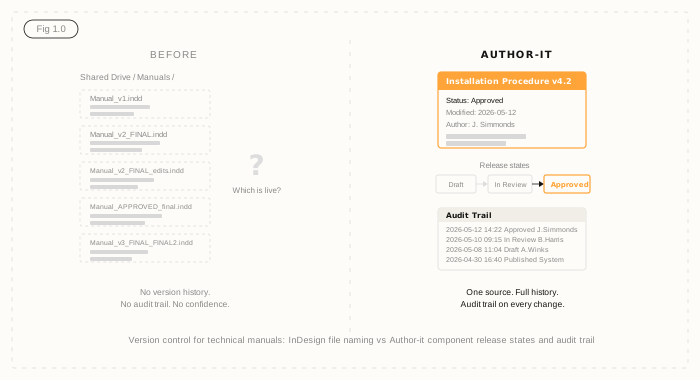
There's no built-in mechanism for tracking document versions, no approval state, no audit trail, and no way to lock a file to prevent parallel edits. What teams get instead is a shared drive full of files with names like:
- Manual_v1.indd
- Manual_v2_FINAL.indd
- Manual_v2_FINAL_edits.indd
- Manual_APPROVED_final.indd
- Manual_v3_FINAL_FINAL2.indd
Which one is live? Which one went to the field last month? Which one did the regulator see? Nobody knows with certainty — and that uncertainty is expensive.
The five hidden costs of manual version management
The version chaos isn't just annoying. It has real financial and compliance consequences that most teams don't add up explicitly.
Time cost - every writer who has to hunt for the current version wastes 20-30 minutes per search. Across a team of five technical writers searching twice a week, that's roughly 200 hours a year spent on a problem that shouldn't exist.
Error cost - when the wrong version reaches the field, you're looking at recall risk, rework, and in safety-critical industries, potential incident liability. A single incorrect procedure in a distributed manual can cascade into a serious operational problem.
Duplication cost - when two writers are working from different versions of a base document unknowingly, their edits diverge. Reconciling those forks takes time and produces inconsistencies that are hard to catch in a final review pass.
Audit cost - when a regulator or auditor asks for the approved version history of a document, manual file archives cannot answer that question confidently. You can show them a folder of files with dates in the names. That's not an audit trail.
Coordination overhead - check-in and check-out processes managed via shared drives or email chains are fragile. People forget, override each other, or work on stale copies. The coordination tax grows with team size.
Why this matters more in regulated industries
For teams in manufacturing, utilities, or any compliance-heavy environment, version chaos is not just inefficient - it's a liability. If you can't demonstrate which document version was approved, when it was approved, and who approved it, you have an audit gap.
ISO standards, safety regulatory bodies, and internal quality management systems increasingly require documented version histories with named approvals. A shared drive of INDD files does not satisfy that requirement. The manufacturing documentation challenge goes beyond formatting: it's about being able to prove, on any given date, exactly what your field teams were working from.
This is the difference between version management as an operational convenience and version control as a compliance requirement.
What good version control for technical manuals looks like
The standard to aim for is component-level version control with a full audit trail. That means:
- Every content component - a procedure, a warning, a specification - has its own version history
- Changes are tracked at the component level, not the file level
- Every change records who made it, when, and what the previous state was
- Content moves through defined release states: Draft, In Review, Approved, Published
- You can answer the question "what was the approved version of this procedure on 14 March?" in seconds, not hours
This is the difference between version naming conventions (fragile, human-dependent) and version governance (structural, systemic, auditable).
Author-it's Review and Approve workflow is built into the authoring layer - not bolted on as an add-on. When a topic moves from Draft to In Review to Approved, that state change is logged with a timestamp and a named user. The audit trail is not a separate spreadsheet - it's structural.
The migration question
The common objection at this point: "migrating away from InDesign will be painful." It's a fair concern. But consider the alternative: the version chaos problem doesn't get smaller as your product range grows. More products mean more documents, more versions, more writers, more risk. The cost of the status quo compounds.
Most Author-it implementations are complete within 90 days. Content migrated from InDesign, Word, and FrameMaker files is structured by the Author-it services team as part of onboarding - you don't arrive at a blank slate. If you want to understand what your current content costs are actually adding up to, the Author-it ROI calculator is a good place to start.
The version control problem is solvable. InDesign is a design tool, and it does its job well. Managing version history for technical manuals at scale isn't that job.

Version Control FAQ
Q: How do you manage version control for technical manuals?
A: Effective version control for technical manuals requires a system that tracks changes at the component level - not the file level. Each content component (procedure, warning, specification) should have its own version history with timestamps, named authors, and approval states. A Component Content Management System (CCMS) provides this natively. InDesign and shared drives do not.
Q: Why is InDesign a problem for version control in technical documentation?
A: InDesign is a layout and design tool, not a content management system. It has no built-in version control, no approval workflow, and no audit trail. Teams using InDesign for documentation management typically resort to filename conventions (v2_FINAL_FINAL2) that are fragile and unreliable. When a regulator or auditor asks for a documented version history, a folder of INDD files cannot satisfy that requirement.
Q: What are the hidden costs of managing technical manuals in InDesign?
A: The hidden costs include: time lost searching for the current version (20-30 minutes per search across multiple writers), error risk when the wrong version reaches the field, duplication when writers work from different version unknowingly, audit exposure when regulators ask for version history, and coordination overhead from managing check-in and check-out via email or shared drives. These costs are real but rarely quantified explicitly.
Q: What is component-level version control?
A: Component-level version control tracks changes at the level of individual content components - a single procedure, a warning notice, a specification table - rather than at the whole-document level. Every component has its own version history: who changed it, when, and what state it moved to. This means a change to one procedure doesn't require a new version of the entire 200-page manual - only the affected component is versioned.
Q: What release states should technical documentation move through?
A: A standard release state model for technical documentation is: Draft (content being written or edited), In Review (sent to subject matter experts or approvers), Approved (sign-off received, ready to publish), Published (live in the field), and Archived (superseded). Each transition should be logged with a timestamp and named user. This creates an auditable trail that satisfies both internal quality management and external regulatory requirements.
Q: Can InDesign be integrated with a version control system?
A: InDesign files can be stored in version control systems designed for design assets (such as Git with Git LFS, or Adobe's own versioning tools), but these track binary file versions, not content changes. They cannot tell you which procedure was approved on a specific date, or who approved it. For regulated technical documentation, binary file versioning is not equivalent to content-level audit trails with named approval states.
Q: How long does it take to migrate from InDesign to a CCMS?
A: Most Author-it implementations are complete within 90 days. The services team handles content migration from InDesign, Word, FrameMaker, and other source formats as part of the onboarding process. The migration timeline depends on content volume and complexity, but the Author-it implementation approach is designed to avoid a blank-slate start - existing content is structured and imported rather than rewritten.
Published on:
Author:
May 16, 2026
Jamie Simmonds
Documentation Manager
Related Resources

Article
Content lock-in: the exit tax nobody budgets for
The cost of leaving a content platform rarely makes the business case - until you try to switch. Here is the exit tax, and how open output removes it.
Article
Audit-ready compliance docs for HVAC manufacturers
HVAC compliance documentation - UL 60335-2-40, CE, AHRI, F-Gas - stays audit-ready through controlled versions and a provable approval trail.
Article
Why HVAC field techs get outdated manuals
HVAC field service documentation that's published once and never updated drives callbacks - here's how single-source publishing keeps techs on the current version.