Article
InDesign vs CCMS for technical manuals at scale

Summary:
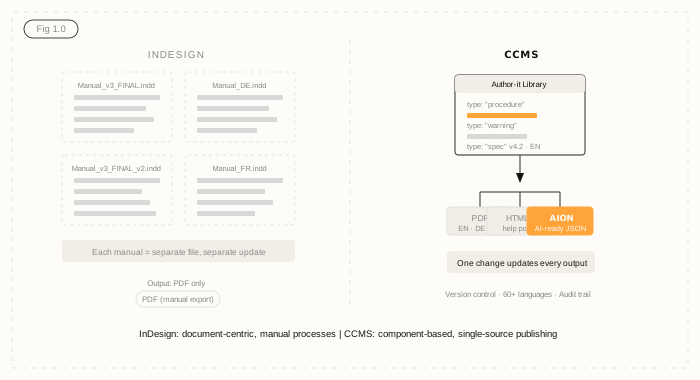
InDesign vs CCMS for technical documentation is less a battle of good vs bad, and more a question of scale. InDesign is a world-class layout tool - built for design-heavy output where a skilled operator controls everything. A Component Content Management System (CCMS) is built for something different: managing hundreds of content components across multiple products, markets, and languages from a single source. The right choice depends on your team size, content volume, translation needs, and where your bottlenecks actually are.
When InDesign makes sense
InDesign is the right tool for plenty of documentation scenarios. If your situation fits the following, you don't need a CCMS yet.
You're producing a small number of print-first manuals - say, under 20 - with a stable structure and minimal content overlap between them. Your team has strong InDesign skills. You publish primarily to PDF, you don't have aggressive translation requirements, and your update cycles are slow enough that manual reformatting doesn't create significant bottlenecks.
In those conditions, InDesign is genuinely good. The layout control is unmatched. Skilled operators can produce beautiful, highly formatted technical documents. If you're a one-person documentation team producing a handful of product guides a year, a CCMS is probably overkill.
The honest answer is: many teams using InDesign today are using it perfectly appropriately for their current scale.
When you've outgrown InDesign
The problems start when scale increases - and they tend to sneak up on you. Here are the signals that InDesign is working against you.
You're managing more than 50 manuals. Every product change triggers a manual search across multiple InDesign files to find every instance of the affected content. You're not sure you've caught them all. A warning statement appears on page 14 of 12 different manuals - and they don't all say the same thing anymore.
You're publishing to multiple languages. Each translation requires sending the full InDesign file to a translator, receiving it back, reformatting it (because translation always breaks the layout), and doing a full quality check. You pay to translate the same boilerplate content every single time, even when nothing changed.
Version control is a spreadsheet, not a system. Files named Manual_v3_FINAL_v2_USE_THIS_ONE.indd aren't an embarrassing joke - they're a genuine compliance risk. If a regulator asks for the approved version of a document from 18 months ago, can you produce it with confidence?
Your team is growing. Multiple writers working on overlapping content in separate files creates duplication by default. One writer updates a spec; another doesn't know. The content drifts. Readers get inconsistent information.
You're trying to publish to HTML or web formats alongside PDF. InDesign can export HTML, but it's not designed for it. The output is messy, hard to maintain, and disconnected from the PDF. If you want to run a help portal, a CCMS does this natively - the same source publishes to both.
And if you're thinking about AI - about feeding your content into LLMs, RAG pipelines, or AI-powered service tools - InDesign PDFs are among the worst possible inputs. PDFs exported from InDesign carry formatting noise, break across columns, and lose structural hierarchy. An AI agent trying to answer a customer service question from an InDesign PDF is essentially guessing. A CCMS structures content at the component level, giving AI systems clean, typed, version-controlled data they can actually use.
What a CCMS adds
A Component Content Management System manages content at the component level - individual topics, warnings, specifications, and procedures - rather than whole documents. Those components are stored once and assembled into deliverables as needed.
In practical terms, that means:
Content reuse. A warning statement or technical specification lives in one place. Every manual that references it pulls from that single source. You update it once, and every output that includes it updates automatically. Author-it customers with complex product documentation typically see 60-90% content reuse - which means 60-90% less writing, translating, and checking to do on each update cycle.
Version control that actually works. Every component has a version history, a release state (Draft, In Review, Approved, Published), and a full audit trail. You can see exactly what changed, when, who approved it, and what outputs it affected. For regulated industries, that audit trail isn't optional - it's the evidence you need to show a regulator.
Translation efficiency. A CCMS only sends new or changed components for translation. If 80% of your content hasn't changed since the last translation run, you only pay for the 20% that has. Single-source publishing combined with translation reuse is where the biggest cost savings appear - Author-it customers have cut translation spend by up to 90% in high-reuse content environments.
Multi-channel publishing. The same source content publishes to PDF, HTML5, SCORM, and AI-ready JSON (AION) in a single operation. You don't maintain separate versions of content for different output formats. A documentation update flows to every channel simultaneously.
Workflow governance. Built-in review and approval workflows mean content doesn't reach publication without sign-off. Every review is tracked. For teams managing safety-critical or compliance documentation, this is the difference between a robust process and hoping someone checked the right file.
Author-it's AION output is worth calling out specifically for teams thinking about AI. AION delivers structured JSON - content hierarchy, component metadata, resolved variables, and authorship - directly from the approved publishing pipeline. Unapproved content provably cannot reach AION output. That's not a configuration setting; it's architectural. It's the difference between AI answers grounded in approved content and AI answers grounded in whatever happened to be in the last PDF export.
InDesign vs CCMS: a comparison
Is it worth switching?
The migration question is the one most teams get stuck on. The honest answer: migration from InDesign is a well-worn path. Author-it's services team has done it from InDesign, Word, FrameMaker, SharePoint, and RoboHelp - most implementations complete within 90 days.
The more useful question is: what is your current setup costing you? Not just in software licensing, but in writer time, translation spend, version control failures, formatting rework, and the compliance risk of content that may or may not be current.
Most organisations that have made the switch say the same thing: they wish they'd done it sooner. Not because InDesign was bad - it wasn't - but because the CCMS eliminated whole categories of work they'd normalised as just part of the job.
If you're not sure where you sit, the Structured Content Challenge benchmarks your current setup and tells you exactly where the gaps are. It takes about 10 minutes and gives you a clear picture of whether a CCMS would move the needle for your team - and by how much.

InDesign vs CCMS FAQ
Q: Should I use InDesign or a CCMS for managing technical manuals?
A: Use InDesign if you manage a small number of print-first manuals, your team is skilled in InDesign, and your update cycles are infrequent. Switch to a CCMS when you're managing 50 or more manuals, publishing to multiple languages, dealing with version control problems, or needing to publish to web and AI channels alongside PDF. The decision is about scale, not quality - InDesign is excellent at what it's built for.
Q: What is the difference between InDesign and a CCMS for documentation?
A: InDesign is a desktop publishing tool that manages whole documents. A CCMS manages content at the component level - individual topics, warnings, and specifications stored once and reused across multiple documents and output formats. The key difference: in InDesign, every manual is a separate file. In a CCMS, content is stored centrally and assembled into manuals, meaning a single update flows to every output that contains it.
Q: When does InDesign stop working for technical documentation management?
A: InDesign starts working against you when you have more than 20-30 manuals to maintain, when you're publishing in multiple languages, when multiple writers are working on overlapping content, or when version control is being managed by file naming conventions. The clearest signals are: inconsistent content across manuals that should say the same thing, translation costs growing linearly with manual count, and no reliable audit trail for compliance purposes.
Q: Can you migrate from InDesign to a CCMS without starting from scratch?
A: Yes. Migration from InDesign to a CCMS is a well-established process. Author-it's services team has completed migrations from InDesign, Word, FrameMaker, SharePoint, and RoboHelp. The typical process involves an information architecture design phase, content import, template setup, and team training - most implementations complete within 90 days. Content from InDesign files is restructured into components during migration, which also eliminates existing duplication.
Q: How does a CCMS reduce translation costs compared to InDesign?
A: In InDesign, every translation run requires sending the full document - including unchanged content. A CCMS only sends new or changed components for translation. If 80% of your content hasn't changed since the last translation cycle, you only pay to translate the 20% that has. Combined with high content reuse rates, Author-it customers have reduced translation spend by up to 90% in high-reuse environments.
Q: Is InDesign content suitable for AI systems and LLMs?
A: PDFs exported from InDesign are poorly suited for AI ingestion. They carry formatting noise, lose structural hierarchy, and give AI systems no way to distinguish a safety warning from a specification or a legal notice. A CCMS like Author-it exports structured JSON via AION - typed content components with metadata, hierarchy, and provenance - that AI systems can reliably parse and cite. If feeding content into RAG pipelines or AI agents is part of your roadmap, a CCMS is the right infrastructure foundation.
Q: What is a CCMS?
A: A Component Content Management System (CCMS) manages content at the component level rather than the document level. Instead of managing whole Word or InDesign files, a CCMS stores individual topics, warnings, procedures, and specifications as reusable components. Those components are assembled into documents (manuals, guides, help content) at publish time, and published to multiple output formats from a single source. This enables content reuse, version control, structured workflows, and multi-channel publishing at scale.
Q: How does Author-it differ from InDesign for technical documentation?
A: Author-it is a Component Content Management System, not a layout tool. Where InDesign gives you precise control over the appearance of a single document, Author-it manages the underlying content - storing it as structured, reusable components and publishing it to multiple formats (PDF, HTML5, SCORM, AI-ready JSON via AION) from a single source. Author-it includes built-in review and approval workflows, component-level version control, translation management for 60+ languages, and structured JSON output for AI pipelines. It is designed for organisations managing large volumes of technical content across products, markets, and languages.
Published on:
Author:
May 21, 2026
Adrian Winks
CEO
Related Resources

Article
Content lock-in: the exit tax nobody budgets for
The cost of leaving a content platform rarely makes the business case - until you try to switch. Here is the exit tax, and how open output removes it.

Article
The real cost of DITA - and when you don't need it
The cost of DITA is mostly staffing and process. Here is where it hides - and how to get topic reuse and single-source publishing without XML.
Article
AI content delivery: own your output, not a hub
The difference between renting an AI delivery hub and owning your content as open, portable JSON that feeds any AI stack you build or buy.