Article
CMS vs CCMS vs knowledge base vs help authoring tool

Summary:
A CMS, a CCMS, a knowledge base, and a help authoring tool all manage content, which is why they get confused - but they manage different things. A CMS runs web pages. A knowledge base serves articles to readers. A help authoring tool builds documents. A CCMS manages reusable components. The one difference that decides which you need is the unit of content each works with. Get that right and the rest of the decision gets easy.
Why these four get confused
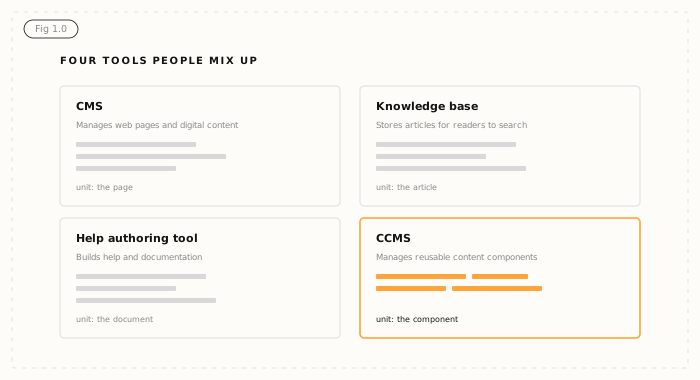
The category names overlap in marketing copy, and vendors blur the lines on purpose - a headless CMS calls itself a CCMS, a knowledge base claims to be AI-ready, a help tool promises single-sourcing. Underneath, each was built to do a specific job. The fastest way to tell them apart is to ask what each one treats as a single unit of content: a page, an article, a document, or a component.
CMS: built for web pages
A content management system manages digital content for websites and apps. Its unit is the page. A CMS is excellent at publishing, layout, and managing who can edit what on a site. It is not built for reuse across formats - the same content rewritten for a PDF, a manual, and a help portal lives as separate copies. If your job is running a website, a CMS is the right tool. If your job is managing technical or regulated content across many outputs, it will fight you.
Knowledge base: built for readers
A knowledge base stores articles so people - customers or staff - can search and read them. Its unit is the article. It is a delivery and findability tool, optimised for the reader at the end of the chain. What it is not is an authoring and management system: it usually has no component reuse, limited version control, and no real way to publish the same content to other formats. A knowledge base is often where content ends up, not where it should be managed.
Help authoring tool: built for documents
A help authoring tool, or HAT, creates help content and documentation, usually from HTML source and around a single author. Its unit is the document. It is a solid starting point for smaller teams, but it scales effort linearly and tends to rely on copy-paste for reuse. If that sounds familiar, the signs you've outgrown a help authoring tool are worth a read.
CCMS: built for components
A Component Content Management System manages content as reusable components - topics, procedures, warnings - stored once in a central library and assembled into many deliverables. Its unit is the component. Because content is managed below the document level, the same approved component can appear in a manual, a help portal, a training course, and an AI pipeline, and a single edit updates all of them. This is the model behind what a CCMS is and does.
The one difference that matters
Strip away the marketing and the distinction comes down to granularity. CMS, knowledge base, and HAT all manage content at the page, article, or document level. A CCMS manages it at the component level.
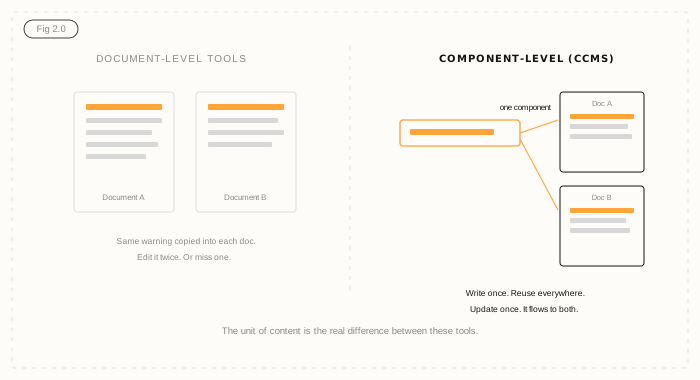
That sounds like a small thing. It is the whole game. Managing content as components is what makes genuine reuse, single-source publishing, component-level versioning, and structured output possible. It is also what separates content that AI can use accurately from content that produces guesswork - because structured components carry the type and context that a flat page or document does not. The difference between structured and unstructured content sits right on this line.
Which one do you actually need?
Match the tool to the job. If you are publishing a marketing website, you want a CMS. If you only need to make existing help articles searchable, a knowledge base may be enough. If you are a small team producing a contained set of documents, a HAT can work for now. If you manage technical, regulated, or multi-output content at scale - and especially if AI is on your roadmap - you want a CCMS. The others can sit alongside it as delivery channels; the CCMS is where the content is actually managed.
Where Author-it fits
Author-it is a CCMS, built around the component as the unit of content. Structured authoring without DITA or XML keeps it accessible, component reuse and built-in review handle scale and governance, and single-source publishing pushes one approved component to every output - including AI-ready structured content via AION. If you have been trying to name what you need and "a better knowledge base" or "a help tool that does reuse" did not quite fit, the word you are looking for is probably CCMS.

Content Tools FAQ
Q: What's the difference between a CMS and a CCMS?
A: A CMS (content management system) manages whole web pages for websites and apps. A CCMS (component content management system) manages content as reusable components - topics and modules - stored once and published to many outputs. The difference is the unit of content: a CMS works at the page level, a CCMS at the component level, which is what enables reuse and single-source publishing.
Q: Is a knowledge base the same as a CCMS?
A: No. A knowledge base stores finished articles so readers can search and read them - it is a delivery tool optimised for findability. A CCMS is an authoring and management system that handles content as reusable components with version control, governance, and multi-output publishing. Content is often managed in a CCMS and delivered through a knowledge base.
Q: What's the difference between a help authoring tool and a CCMS?
A: A help authoring tool manages whole documents, usually for a single author, and relies on copy-paste for reuse. A CCMS manages reusable components shared across many documents and outputs, with multi-author collaboration, component-level versioning, and built-in review. A HAT works for smaller teams; a CCMS is built for scale and reuse.
Q: Can a CMS manage technical documentation?
A: A CMS can publish technical documentation, but it is not built to manage it. Without component-level reuse and versioning, the same content gets duplicated across formats and drifts out of sync. For technical or regulated documentation that needs reuse, governance, and multiple outputs, a CCMS is the appropriate tool.
Q: Which is best for AI-ready content?
A: A CCMS is best for AI-ready content. Because it manages content as structured, typed components with metadata, it can publish a structured output that AI systems can use accurately. Page-level and document-level tools produce flat content that an AI has to interpret, which raises the risk of inaccurate or unverifiable answers.
Q: Do I need a CCMS or just a knowledge base?
A: If you only need to make existing articles searchable for readers, a knowledge base may be enough. If you need to author, reuse, version, govern, and publish content across multiple outputs - or feed AI accurately - you need a CCMS. Many organisations use both: a CCMS to manage content and a knowledge base to deliver it.
Published on:
Author:
May 18, 2026
Adrian Winks
CEO
Related Resources

Article
The CCMS reckoning: six priorities for the AI era
A response to the industry's CCMS reckoning: the six priorities content leaders now face, and an honest look at which are shipped versus roadmap.

Article
CCMS for SaaS: why software docs are different
SaaS content has to ship on the release cadence and feed several surfaces at once, from one source.
Article
DITA vs structured authoring without XML
It's a fit question, not a quality one - and you don't need DITA to get AI-ready content.