Article
Signs you've outgrown your help authoring tool

Summary:
A help authoring tool scales your effort with your content - and eventually that maths stops working. The signs you've outgrown it are familiar: copy-pasting between outputs, never being sure the field has the current version, translation costs climbing with every release. This is how to recognise the ceiling, what a CCMS changes, and why moving up is less disruptive than staying put. If three or more of these signs sound like your week, you've already outgrown the tool.
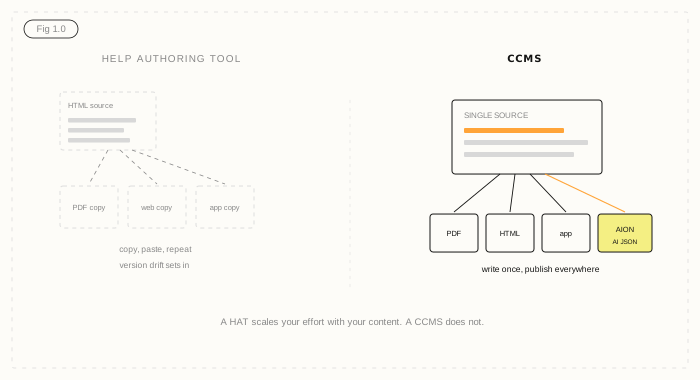
The tool was right - until it wasn't
A help authoring tool, or HAT, is a fine place to start. One writer, a manageable set of help content, a couple of output formats. It does the job.
The trouble is that a HAT scales linearly. Twice the content is roughly twice the work. More outputs, more languages, more reviewers - each one multiplies the effort instead of absorbing it. Most HATs are built on HTML source and designed around a single author working in a local file set. That foundation holds until your content operation grows up, and then it starts to wobble. None of the signs below is fatal on its own. Three or more together means you've outgrown the tool.
Six signs you've outgrown your help authoring tool
1. You're copy-pasting the same content between outputs
The same warning, the same procedure, pasted into the PDF, the web help, and the in-app text. When the content changes, you update it in several places - or you forget one. Duplication is the clearest sign you've outgrown single-document authoring.
2. Nobody's sure which version is current
If your honest answer to "is the field on the latest version?" is "probably," version drift has set in. A HAT tracks files, not components, so the same content can exist in several states at once with no reliable record of which is approved.
3. More than one person needs to work at once
HATs are built around a single author and a local project. The moment you have writers, subject matter experts, and reviewers who all need to work on the same content, file-based tools turn into a queue. People wait, or they work on copies and reconcile later - which brings you back to sign one.
4. Translation cost climbs with every release
If you pay to translate whole documents each release - including the 80% that didn't change - your costs scale with volume, not with change. That's a HAT limitation: without component-level reuse, the translation memory can only do so much.
5. Reviews and approvals live outside the tool
Sign-off happens over email, in tracked-changes files, or in someone's head. There's no audit trail, and no way to stop unapproved content reaching an output. As soon as accuracy or compliance matters, that gap becomes a real risk. Much of this traces back to the difference between structured and unstructured content.
6. You now need outputs your HAT can't produce
The output list keeps growing - and lately it includes AI. Feeding an LLM, a chatbot, or a RAG pipeline needs structured, governed content, not an HTML export. If your tool can't produce a clean structured output, your content can't safely feed the AI everyone's now asking for.
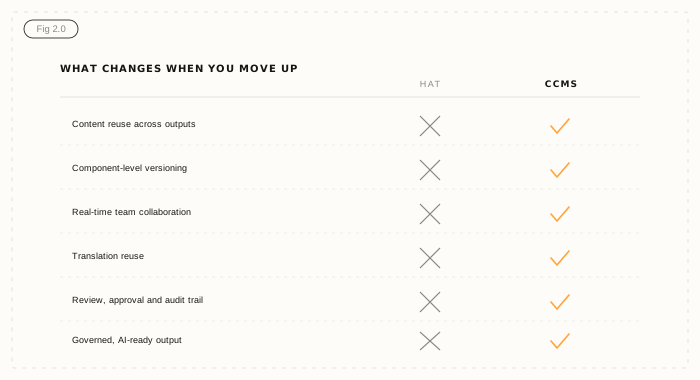
What good looks like: a CCMS
The step up from a HAT is a Component Content Management System. Instead of authoring documents, you author components - topics, procedures, warnings - stored once in a central library and reused everywhere they're needed. Change a component in one place and every document that uses it updates automatically. For a full primer, see what a CCMS is.
That single change reverses the maths. Reuse means you write new content instead of recreating old content. Translation only touches what actually changed. Multiple people work on the same library at once. Review and approval are built in, with an audit trail. And one source publishes to every output - PDF, HTML, in-app, and AI-ready structured JSON - without copy-paste. Your effort stops scaling with your content.
Moving up is less painful than staying put
The usual worry is migration. It's a fair concern, and it's smaller than it looks. A good move is phased: audit what you have, map your content into components, import in stages, and build a reuse strategy as you go. Author-it's services team has run this from Word, SharePoint, and HTML-based tools many times, and most migrations complete in well under a quarter. Weigh that against the compounding cost of staying on a tool you've outgrown - the duplication, the drift, the translation bills - and standing still is usually the more expensive option. You can put rough numbers on it with the content ROI calculator.
Where Author-it fits
Author-it is a CCMS built for exactly this transition. Structured authoring without DITA or XML keeps authoring accessible, so your writers aren't trading one learning curve for a worse one. Component reuse, built-in review and approval, and translation reuse handle the signs above directly. And AI-ready output via AION means the content you move into Author-it is ready for the AI work coming next, not just the PDF you ship today. Twenty-five years of doing this in regulated industries means the hard parts - information architecture, governance, migration - are familiar ground.

Help Authoring FAQ
Q: What is a help authoring tool?
A: A help authoring tool, or HAT, is software for creating help content and documentation, usually built on HTML source and designed around a single author working in a local project. It works well for smaller content sets and a limited number of outputs, but tends to scale effort linearly as content, languages, and contributors grow.
Q: When should you move from a help authoring tool to a CCMS?
A: Move when the signs of outgrowing a HAT stack up: copy-pasting content between outputs, uncertainty about which version is current, multiple people needing to work at once, translation costs climbing every release, approvals happening outside the tool, and new output demands like AI. Three or more of these together is a clear signal a CCMS will pay off.
Q: What's the difference between a HAT and a CCMS?
A: A help authoring tool manages whole documents, usually for one author and a few outputs. A Component Content Management System manages content as reusable components stored once in a central library, with component-level versioning, multi-author collaboration, built-in review and approval, translation reuse, and single-source publishing to many outputs including AI-ready formats.
Q: Is migrating from a help authoring tool to a CCMS difficult?
A: It is more manageable than most teams expect. A phased approach - audit, map content into components, import in stages, build a reuse strategy - keeps disruption low. With experienced services support, most migrations from Word, SharePoint, or HTML-based tools complete in under a quarter.
Q: Can a CCMS publish the same outputs as a help authoring tool?
A: Yes, and more. A CCMS publishes to PDF, HTML, in-app help, eLearning, and AI-ready structured output from a single source, without the copy-paste a HAT requires. The same content change flows automatically to every output.
Q: Why does HTML-based source content become a problem at scale?
A: HTML source describes how content looks, not what it is, and it is tied to documents rather than reusable components. As content grows, that makes reuse, versioning, and governance hard to enforce, and it cannot produce the structured, typed output that AI systems need to use content accurately.
Published on:
Author:
May 28, 2026
Jamie Simmonds
Documentation Manager
Related Resources
Webinar
Author-it 2026.R3 Release Webinar - What's New
The full Author-it 2026.R3 release webinar recording, with the biggest New Word update yet, richer AION output, and the R3 go-live dates.

Article
Content lock-in: the exit tax nobody budgets for
The cost of leaving a content platform rarely makes the business case - until you try to switch. Here is the exit tax, and how open output removes it.

Guide
CCMS for HVAC manufacturers: a buyer's guide
CCMS for HVAC manufacturers must handle refrigerant change, variant sprawl, and multi-market translation. Here are the criteria to score vendors before you buy.