Article
Does Author-it enforce structured authoring? Yes. Here's how

Summary:
Yes. Author-it enforces structured authoring through structured templates and the Structure Builder. You define rules for each topic or book type (which sections are required, in what order, how many times, and which styles, images, variables or embedded topics are allowed), and every object based on that template inherits them. Authors see validation as they write, and an "enforce" release state means content that breaks the rules cannot be approved, so a publishing profile that only takes that release state never publishes invalid content. Enforcement is switched on per template, which is why a library that never turned it on can look free-form. It is a configuration choice, not a missing feature, and it is fully documented in the current 2026.R1 Author guide.
Where the "not enforced" idea comes from
Every so often we hear that Author-it "doesn't enforce structured writing". It usually comes from someone who used a library where nobody switched the structure rules on. That's a fair description of their library. It isn't a fair description of the product.
There are three reasons the impression sticks. First, Author-it authors write in a word-processor-style editor, so it looks like the kind of tool that lets you do anything. Second, structure rules are optional by design: an ordinary template carries styles and properties but no rules, and plenty of teams stopped there. Third, we have spent years saying "no DITA, no XML", and some people heard "no structure". Those are different things. DITA is one way to enforce structure. Rules on templates are another.
So here is how enforcement actually works, using the names you will see in the product.
Structured templates and the Structure Builder
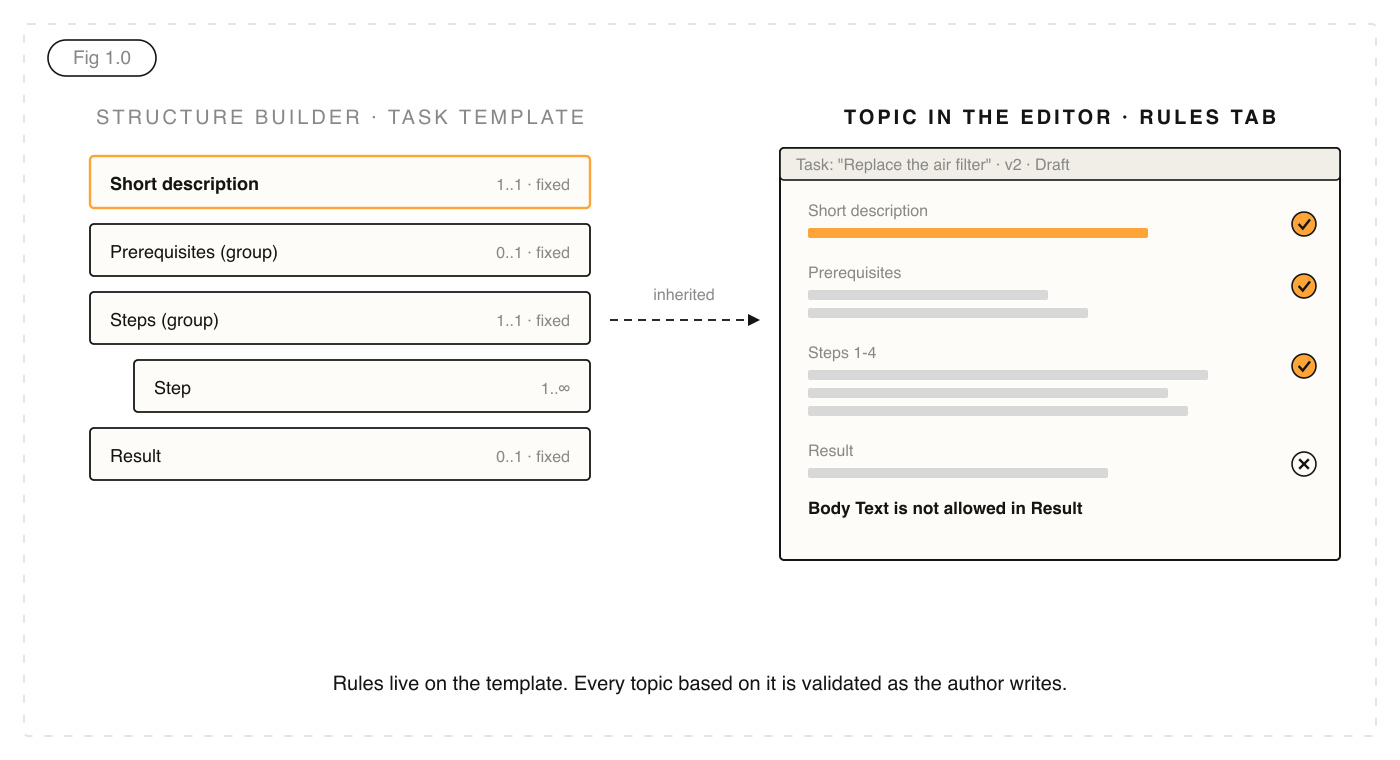
Enforcement starts with a template. Tick the structured template option in a template's properties and it becomes a structured template. Then open Manage > Data > Structure Builder and write the rules. Every topic or book based on that template inherits the structure. Nobody types a tag.
A topic structure is built from rules:
- Paragraph rules, which say which paragraph styles may be used at that point in the topic.
- Group rules, which wrap several rules into a section, such as "Steps", that can repeat or be optional as a unit.
- Table rules, which control the styles used in table rows and columns.
- Inline rules, which restrict character styles, embedded topics, images, hyperlinks and variables inside a paragraph, and can enforce instances of fixed text.
Every rule has the same handful of properties, and they are what make the structure strict or loose:
- Minimum and maximum occurrences. Set both to 1 and the content must appear exactly once. Set the minimum to 0 and it is optional. Set both to 0 and it is prohibited, for example no images in a short description.
- Sequence. Fixed rules must appear in the order they sit in the structure. Flexible rules can swap places with neighbouring flexible rules.
- Allowed objects. Name specific styles or objects, or allow a template so anything based on it is valid. Inside a structured topic, authors only see the paragraph styles the rules allow.
The product guide's own example is a Task template that must start with a paragraph in the Short description style. If that sounds like DITA, that's the point. You can model concept, task and reference topics this way, or your own information types. Our guide to setting up Author-it like DITA walks through it step by step.
What authors see while they write
A structured topic opens in the Editor with two extra tabs. The Rules tab shows, rule by rule, whether the content validates. The Example tab shows a linked example topic, so an author can see what a finished Task or Reference topic should look like before they start.
Authors can run Validate Topic or Validate Book from the Review tab at any time. Content fails validation when it uses a style or object the rules don't allow, appears too few or too many times, sits in the wrong place, or falls outside every rule. Pasted text is validated like anything else, so copying a chunk from an old Word file doesn't sneak past the rules.
In Quick-Editing Mode, the folder list shows each structured object as valid (a tick), invalid (a cross) or unvalidated (not structured), so an editor can see the state of a whole folder at a glance.
Where it is enforced: release states and publishing
Warnings alone don't enforce anything. This is the part that does.
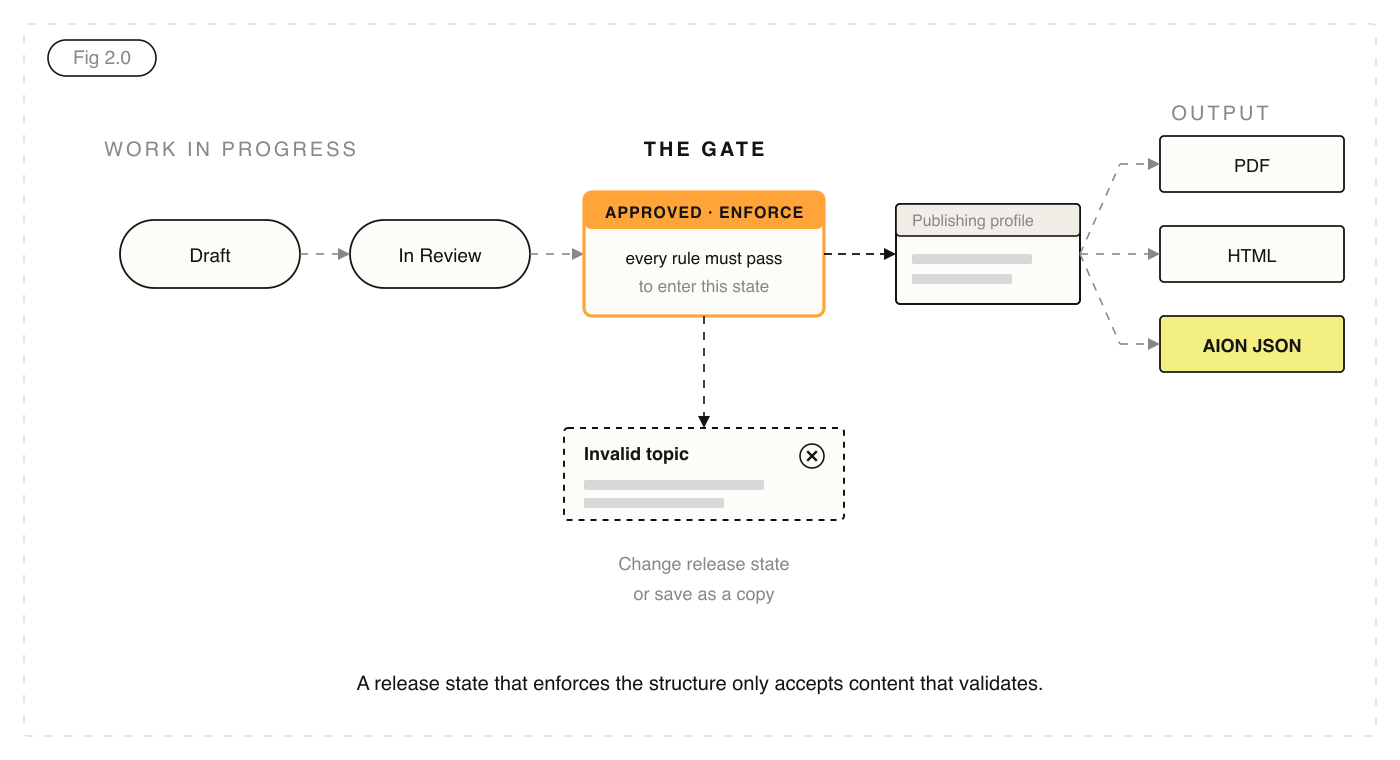
Each structure can name one or more release states that enforce validation. While a topic is in draft or review, authors can save work in progress. To move it into the enforce state, typically your approved state, every rule has to pass. Once it is there, edits that would break validation can't be saved over it. The author either moves it back to a non-enforcing state, saves the change as a copy, or cancels.
Then the publishing profile closes the loop. Publishing profiles can filter on release state, so a profile that only accepts the approved state only publishes content that has validated. Invalid content doesn't reach the PDF, the portal, or the AI.
The same check runs when an administrator changes the rules. Tighten a structure and Author-it validates every topic based on that template. If any approved topic would become invalid, you choose: move those topics to another state, save the new rules as a copy of the template, or cancel.
Books are structured too
Book templates get their own structure rules. A book structure can require a title page, table of contents or index (each once, in a fixed place), and use Topic, File and Book rules to control which topics, files and sub-books may appear, how many and where. The guide's example is a Product guide template that must start with a topic based on the Product description template.
Two other controls help. Book templates can be restricted to specific publishing profiles, so a book can't be pushed to an output it isn't set up for. Book Content Duplication lets a template designer decide which topics may or must be reused or copied when someone creates a new book from that template.
Formatting is controlled even before you add rules
Without a single structure rule, Author-it still doesn't allow direct formatting. Authors apply paragraph and character styles, and styles are objects managed centrally in the library. Folder permissions can restrict who may create or change templates and styles, so the people who set standards are the only people who can change them.
That is why some teams never turn structure rules on: style discipline and good templates get them most of the way. For regulated content, or content headed for AI, "most of the way" isn't the bar. Rules and an enforcing release state are.
Why it matters more now: AI
An AI assistant answering from your documentation is only as reliable as the content's shape. A task with no prerequisites section, a warning written as a body paragraph, or a reference table pasted as an image all make retrieval worse. Enforced structure means every topic of a type looks the same to a machine, not just to a reader.
Author-it's AION output publishes structured JSON for AI from the same publishing profiles, so the same release-state gate applies. Approved, validated content goes out. Drafts and broken topics don't. We cover the wider question in do you need DITA for AI-ready content?
Strict where you need it, flexible where you don't
DITA enforces typing everywhere, all the time. Author-it lets you choose per template. You might lock down tasks, warnings and safety content with fixed, required rules, keep release notes looser, and leave marketing-adjacent content on ordinary templates. You can also phase it in: create new structured templates, convert topics as they come up for review, and use a new release state to enforce validation so the conversion doesn't trigger re-translation of everything already approved.
If you have been told Author-it doesn't enforce structure, the honest answer is that it enforces exactly as much as you configure. If you want to see what that looks like on your own content, book a working session and bring a topic type you care about. For the full comparison with DITA, see Author-it vs DITA.

Structured authoring FAQ
Q: Does Author-it enforce structured authoring?
A: Yes. Structured templates carry rules built in the Structure Builder: which content is required, in what order, how many times, and which styles and objects are allowed. Authors see validation in the Editor, and a release state set to enforce the structure cannot be assigned to content that fails the rules. Publishing profiles that only accept that release state never publish invalid content.
Q: Is structured authoring optional in Author-it?
A: Yes, by design. Structure rules are switched on per template, so you can enforce strict rules for tasks, warnings or regulated content and keep other content on ordinary templates. Even without rules, Author-it requires paragraph and character styles rather than direct formatting, and folder permissions control who can change templates and styles.
Q: Is structured authoring still supported in Author-it Cloud?
A: Yes. Structured templates, the topic and book Structure Builder, rule validation and enforcing release states are documented in the current Author-it Cloud 2026.R1 Author Module Guide and on the Author-it Knowledge Center. Quick-Editing Mode also shows whether each structured object is valid or invalid.
Q: How do you enforce topic types like concept, task and reference without DITA?
A: Create a structured template for each topic type and define its rules in the Structure Builder, for example a Task template that must open with a short description, then contain prerequisites, steps and a result. Link an example topic so authors can see the pattern, and set your approved release state to enforce validation.
Q: What happens when content does not validate?
A: It can still be saved while it is in a draft or review state. It cannot move into a release state that enforces the structure until every rule passes. If someone edits approved content and breaks validation, they must change the release state, save the change as a copy, or cancel.
Q: Do I need to know XML to set up structure rules in Author-it?
A: No. Rules are created in a wizard-like Structure Builder and saved against a template. Authors write in the normal Editor with no XML tagging, and validation is shown in the Editor's Rules tab.
Q: Does enforced structure help with AI?
A: Yes. When every topic of a type has the same required parts in the same order, AI retrieval and answers are more consistent. Author-it publishes AION structured JSON through the same publishing profiles, so the release-state gate that keeps invalid content out of PDF and HTML also keeps it out of AI output.
Published on:
Author:
November 22, 2026
Jamie Simmonds
Documentation Manager