Guide
FrameMaker migration to a modern CCMS

Summary:
Migration anxiety is the number one reason FrameMaker teams stay put longer than they should. The fear is reasonable - people have been burned by big-bang conversions before - but a modern CCMS migration doesn't have to look like that. This guide walks through what a realistic FrameMaker migration involves: inventory, structure mapping, parallel authoring, and a phased cutover. The short version: migrate in phases with expert help, and the risk drops sharply.
Why FrameMaker teams put migration off
FrameMaker is a powerful, deeply embedded tool, and teams have often invested years in it. The reluctance to move usually isn't loyalty - it's the memory of a painful conversion, or the fear of one. Add uncertainty about what happens to complex, structured documents, and it's easy to keep deferring.
The deferral has a cost, though: content stays locked in a format that's harder to reuse, translate, and feed to AI. If you're weighing the move, our CCMS evaluation checklist helps you judge where you'd actually land.
What a realistic migration actually looks like
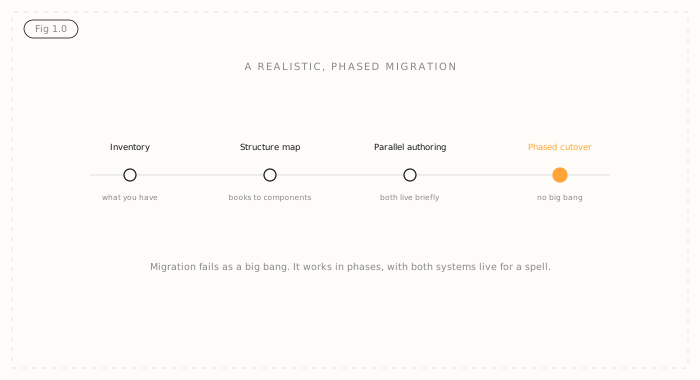
Done well, a FrameMaker migration is phased, not a big bang. It runs in four broad stages.
Inventory: catalogue what you actually have - which books, which are current, what's duplicated, what can be retired. Most teams find they migrate less than they feared.
Structure mapping: decide how FrameMaker books and their structure map to reusable components and topics. This is the real work, and where experience pays off.
Parallel authoring: run both systems for a defined period so nothing stops shipping while content moves.
Phased cutover: move content in tranches - by product line or document set - rather than all at once, so risk is contained at each step.

Before planning the migration, it's worth seeing the two side by side: Author-it vs Adobe FrameMaker covers where FrameMaker still holds up and where it stops.
How to de-risk it
Three things reduce migration risk more than anything else. First, ruthless inventory - don't migrate content you should retire. Second, get information architecture right before you move at scale, because a clean component model is what makes the destination worth reaching. Third, don't do it alone: a services-led migration, where the vendor brings people who've done this from FrameMaker before, turns the scary part into a project plan.
Where Author-it fits
Author-it migrations are services-led by design. The team has moved content from FrameMaker, and from Word, Confluence, and other tools, many times, and most complete within about 90 days depending on scope. You get structured authoring without DITA, so contributors aren't forced into XML; component reuse and single-sourcing; translation managed against the source; and AION, a structured AI output, so the content you migrate is ready for AI, not just for print.
The point of migrating isn't to swap editors - it's to turn locked documents into reusable, governed, AI-ready content. Benchmark where your content sits with the Structured Content Challenge, or see how it works for regulated manufacturing.

FrameMaker Migration FAQ
Q: How do you migrate from FrameMaker to a CCMS?
A: In four broad phases: inventory what you actually have and retire what you don't need, map how FrameMaker books and structure become reusable components, run both systems in parallel for a defined period so publishing continues, then cut over in tranches rather than all at once. Done this way, migration is a managed project rather than a big-bang risk.
Q: Is migrating off FrameMaker risky?
A: It's much less risky when phased and supported. The risk in migrations comes from big-bang cutovers, unclear information architecture, and migrating content you should have retired. A ruthless inventory, IA work up front, and a services-led approach with people who've done FrameMaker migrations before contain the risk at each step.
Q: How long does a FrameMaker migration take?
A: It depends on content volume and how much is retired versus restructured, but many migrations complete within about 90 days when run in phases with expert help. The inventory and information-architecture decisions usually take more time than the content moves themselves, which is why starting there pays off.
Q: Do I have to convert FrameMaker files to DITA?
A: No. DITA is one destination, but structured authoring without DITA delivers the same reuse and single-sourcing benefits without requiring XML expertise from your authors. Whether DITA is the right target depends on your standards requirements; it isn't a prerequisite for leaving FrameMaker.
Q: What should I do before migrating from FrameMaker?
A: Run a content inventory first. Catalogue which books are current, which are duplicated, and which can be retired, because most teams migrate less than they feared. Then design the component model and information architecture before moving content at scale, since a clean destination structure is what makes the migration worthwhile.
Q: What do I gain by moving off FrameMaker?
A: You turn locked documents into reusable, governed content: component reuse and single-sourcing, translation of only what changed, multi-channel publishing, version control and audit trail, and a structured AI-ready output. The goal isn't a different editor, it's content you can reuse, govern, and feed to AI reliably.
Published on:
Author:
June 11, 2026
Jamie Simmonds
Documentation Manager
Related Resources

Article
Content lock-in: the exit tax nobody budgets for
The cost of leaving a content platform rarely makes the business case - until you try to switch. Here is the exit tax, and how open output removes it.
Article
Docs-as-code vs CCMS: the limits at scale
Markdown is prose with formatting. Structured content carries what reuse and reliable AI retrieval need.

Guide
FrameMaker migration to a modern CCMS
Migration anxiety keeps FrameMaker teams put. A phased, supported move drops the risk sharply.