Article
Migrating ISO documentation from Word to a CCMS

Why it matters:
Most ISO-certified manufacturers know their Word-based documentation is creating risk. The question isn't whether to migrate - it's how to do it without the certification implications they're worried about.
Summary:
Every ISO-certified manufacturer that relies on Word documents for quality management system documentation knows, somewhere, that the system isn't as controlled as it should be. The version with 'FINAL' in the filename. The approval email from someone who left two years ago. The procedure that was updated but the distributed copies weren't. The question isn't whether to migrate - it's how to do it without disrupting a certification that took years and considerable effort to earn.
The answer is that a well-run migration to a CCMS carries no certification risk. Here's what the process actually looks like.
The fear behind the migration question
When quality managers and documentation leads ask about migrating to a CCMS, the concern underneath the question is almost always the same: will our certification body view a system change as a risk? Do we need to notify them? Could a migration trigger an unplanned audit? Could we lose certification during the transition?
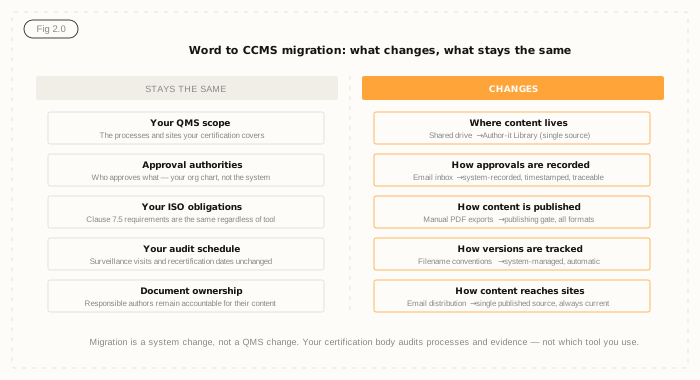
The direct answers are: no, no, no, and no. ISO 9001 doesn't certify your document management tool - it certifies your quality management system. Your certification body audits whether your QMS processes are functioning and your documented information is controlled. A system migration, managed correctly, doesn't change either of those things. What changes is where content lives, how approvals are recorded, and how content is published. The QMS scope, the approval authorities, the ISO obligations, and the audit schedule remain exactly the same.
The migration itself is not a notifiable event with most certification bodies. If in doubt, contact your CB and ask - most will confirm that a tool change is an internal matter as long as the QMS continues to function correctly and documented information remains controlled throughout.
Phase 1: Audit your current documentation
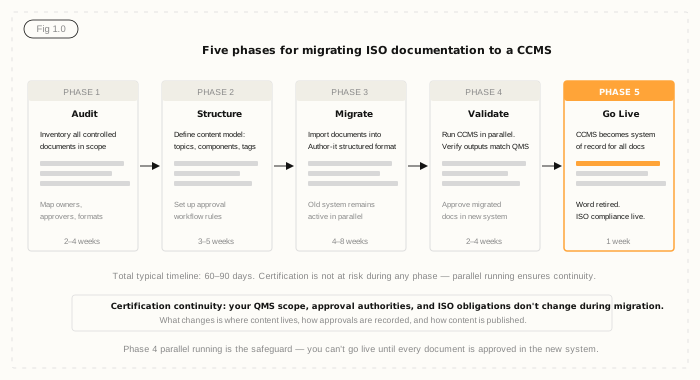
Before any content moves, you need a complete picture of what you have. This means a full inventory of all documents currently in scope for your ISO certification: every controlled procedure, every work instruction, every quality form, every externally-sourced document that your QMS references.
For each document, the audit captures: who owns it, who currently approves it, what its current approved version is, where it's stored, who has access to it, and which outputs it currently produces. This isn't just an exercise in mapping - it often reveals documents that should be controlled but aren't, procedures that were updated without formal approval, and external documents that are referenced but not formally tracked.
The audit takes two to four weeks for most manufacturing organisations and is the foundation everything else builds on. It's also frequently the point where organisations discover that their documentation state is less controlled than they believed - which strengthens the case for migration rather than weakening it.
Phase 2: Structure your content model
Author-it is a component content management system - content exists as reusable components rather than as whole documents. Before migrating content, you need to define the content model: what types of components will exist, how they're tagged, what metadata each carries, and how they're assembled into published documents.
This is the architectural phase of the migration. The Author-it implementation team works with your documentation lead to design a structure that matches your organisation's QMS needs: procedure types, work instruction formats, form templates, and the approval workflow configuration that mirrors your existing approval authority structure.
For most manufacturing organisations, this phase takes three to five weeks. The output is a content model and a configured Author-it environment ready to receive migrated content. The approval workflow in Author-it mirrors your existing authority structure - the same people who approved documents before continue to approve them, through a workflow that's recorded in the system rather than in email.
Phase 3: Migrate the content
With the content model defined, content migrates from Word or SharePoint into Author-it. The Author-it migration toolkit handles the import of Word documents, converting document structure into components. Complex, heavily formatted legacy documents may require some manual restructuring to match the new content model.
During this phase, your existing Word-based system remains fully operational. This is the parallel running period - both systems contain the same content, both are functional, and your certified processes continue to operate normally. There's no point during migration where content is unavailable or where your QMS is in an undefined state.
This phase takes four to eight weeks depending on content volume and complexity. Organisations with large legacy libraries - hundreds of controlled documents in Word format - typically take longer. Those with a defined, consistent document structure migrate faster.
Phase 4: Validate before go-live
Before Author-it becomes the system of record, every migrated document goes through an approval cycle in the new system. This serves two purposes. First, it produces an approval trail in Author-it for every document - the system-recorded evidence of approval that the old email-based process couldn't provide. Second, it gives the quality team confidence that every document in Author-it is the current approved version before the old system is retired.
Validation also involves checking outputs: running published PDFs against the source documents, confirming that the content matches, and verifying that the publishing gate is functioning correctly. An unapproved document in Author-it cannot be published. The team verifies this by attempting to publish a document that hasn't been through the workflow and confirming it's blocked.
This phase typically takes two to four weeks. It's the quality gate before go-live, and it's also the phase that most reassures quality managers - by the time go-live happens, every document has a system-recorded approval trail and every output has been verified against its source.
Phase 5: Go live
Go-live is a one-week process. Author-it becomes the system of record. The old Word documents are archived - not deleted, but removed from active use and marked as superseded. All publishing moves to Author-it. The publishing gate is live, approval workflows are active, and from this point forward every change to a controlled document requires system-recorded approval before it can reach any output.
The total timeline from project kickoff to go-live is typically 60 to 90 days for most manufacturing organisations. Complex organisations with large content volumes or multiple sites may take up to 180 days. The Author-it services team has completed migrations from Word, SharePoint, FrameMaker, and legacy document management systems, and can provide accurate timeline estimates based on a documentation audit.
What your certification body sees
If your surveillance audit falls during or shortly after the migration, your certification body will see a quality management system with better document control than before. System-recorded approval trails. A publishing gate that prevents unapproved content from reaching any output. Version control that doesn't depend on filename conventions. Evidence of compliance that's retrievable in seconds rather than through inbox searches.
This is the outcome the standard requires. The tool that produces it is your choice. Use the ROI calculator to quantify the cost of the current approach against the investment in migration, and the Structured Content Challenge to assess where the current gaps are most likely to surface in your next audit.
So, the question isn't whether to migrate - it's how. Author-it vs Microsoft Word covers what changes when you move ISO documentation off Word.

Word to CCMS migration FAQ
Q: Will migrating to a CCMS affect our ISO 9001 certification?
A: No. ISO 9001 certifies your quality management system - the processes, controls, and evidence of compliance - not the specific tool you use to manage documentation. A migration from Word to a CCMS, managed correctly with parallel running during transition, maintains documentation control throughout and doesn't change your QMS scope, approval authorities, or audit schedule. Most certification bodies treat a tool change as an internal matter that doesn't require notification, as long as the QMS continues to function correctly. Confirm with your specific CB if you have concerns.
Q: How long does it take to migrate ISO documentation from Word to a CCMS?
A: For most manufacturing organisations, a Word-to-CCMS migration takes 60 to 90 days from project kickoff to go-live. The five phases are: documentation audit (2–4 weeks), content model design (3–5 weeks), content migration (4–8 weeks), validation and approval (2–4 weeks), and go-live (1 week). Phases overlap, so the total is shorter than the sum of each phase. Complex organisations with large content volumes or multiple sites may take up to 180 days. The Author-it services team can provide an estimate after reviewing your documentation landscape.
Q: What happens to our approval trails during migration?
A: Existing approval trails - typically email records from before the migration - are preserved as archived evidence in your old system for the retention period your QMS requires. Going forward, all approvals are recorded in Author-it: who approved, in what role, when, and against which version. This is typically an improvement over the pre-migration state, where approval trails depended on email archives that could become inaccessible. For any audit covering the pre-migration period, the email archive serves as the approval trail. For the post-migration period, Author-it provides a complete, system-recorded trail.
Q: Do we have to move all our documents at once?
A: No. A phased migration - moving one document category, product line, or site at a time - is a common and often preferable approach. It lets the documentation team develop familiarity with the new system before handling the full library, and it means the parallel running period is shorter and simpler. The Author-it implementation team can design a migration plan that sequences content by priority, risk, or volume to match your organisation's preferences and resource constraints.
Q: What does 'structured content' mean for documents that are currently in Word?
A: Structured content breaks documents into discrete, tagged components - procedure steps, warnings, specifications, notes - rather than treating a document as a single unbroken text. Each component has metadata describing its type, applicability, approval status, and version. In practice, migrating from Word means identifying the distinct content types within your documents and mapping them to components in the Author-it content model. The Author-it migration toolkit helps automate this for consistently formatted Word documents. Complex or inconsistently formatted legacy content may require more manual restructuring.
Q: What is parallel running during a CCMS migration?
A: Parallel running is the phase where both the old Word-based system and the new Author-it CCMS contain the same content and both are operational. During this phase, your certified processes continue to operate normally - staff continue to use the existing system while the migration team works in Author-it. The parallel run ends when every document has been migrated, validated, and approved in Author-it, at which point the old system is archived and Author-it becomes the single system of record. Parallel running is the safeguard that ensures no period during migration where documented information is unavailable or uncontrolled.
Q: Can Author-it import existing Word documents automatically?
A: Author-it's migration toolkit can import Word documents and convert their structure into components. The quality of automated import depends on how consistently the source documents are formatted. Documents that follow a consistent structure and use Word styles correctly import most cleanly. Documents with ad hoc formatting, merged tables, or complex layouts may require manual adjustment after import. The Author-it implementation team reviews a sample of your documentation before migration to estimate the level of manual work required and provide an accurate migration plan.
Published on:
Author:
April 2, 2026
Osmar Silva
CTO
Related Resources
Article
Field crew AI: when a wrong answer is a safety risk
Why safety-critical field operations can't run AI on ungoverned content - and what deterministic, traceable answers actually require.

Article
AI service assistants for manufacturing field techs
What it takes to put an AI service assistant in a manufacturing field tech's hands without risking a wrong, outdated, or unsafe answer.
Article
AI-ready content: who has actually shipped it?
A practical field guide to separating AI-ready content marketing from vendors who have actually shipped a structured, governed output for AI.