Guide
Structured Authoring & Content Reuse Handbook | Author-it

Introduction: From Document Management to Content Strategy
This handbook is designed to elevate your perspective on Author-it Cloud, transforming your approach from tactical feature usage to the strategic implementation of a process-driven content methodology. It is a guide for the information architects and content developers tasked with building a sophisticated, scalable content ecosystem. If you've ever sent an email saying "ignore the last version, here's the right one: FINAL_v3_REAL_THIS_TIME" - this guide is for you.
Adopting a component-based authoring paradigm is a critical business transformation, not merely a new workflow. Failing to make this shift perpetuates the high costs of traditional content management: content decay, brand inconsistency, duplicated authoring and review efforts, and escalating translation expenses.
The core goal of this guide is to empower you to establish efficient, consistent, and scalable content operations by mastering the principles of structured authoring, content reuse, and variant management. You will learn to move beyond traditional, document-centric authoring to a component-based, object-oriented approach - the foundational paradigm of Author-it Cloud.
This handbook will guide you through foundational concepts, establishing a scalable architecture, mastering core workflows for reuse and structure, managing content variation, and integrating these practices into the complete content lifecycle.
New to structured content? The Structured Content Challenge shows you the difference in 90 seconds. And if your team is heading toward AI, this same component model is what makes content usable by LLMs - the AI content foundation behind reliable enterprise AI.
1. The Author-it Cloud Paradigm: A Component-First Approach
To unlock the full potential of Author-it Cloud, it is essential to first internalize its fundamental paradigm. Traditional content creation focuses on producing monolithic, standalone documents. Author-it Cloud, in contrast, is built on a modern, component-based methodology where content is deconstructed into reusable "objects." This approach is the key to achieving consistency, scalability, and efficiency in any content operation.
Core Concepts of Single-Sourcing
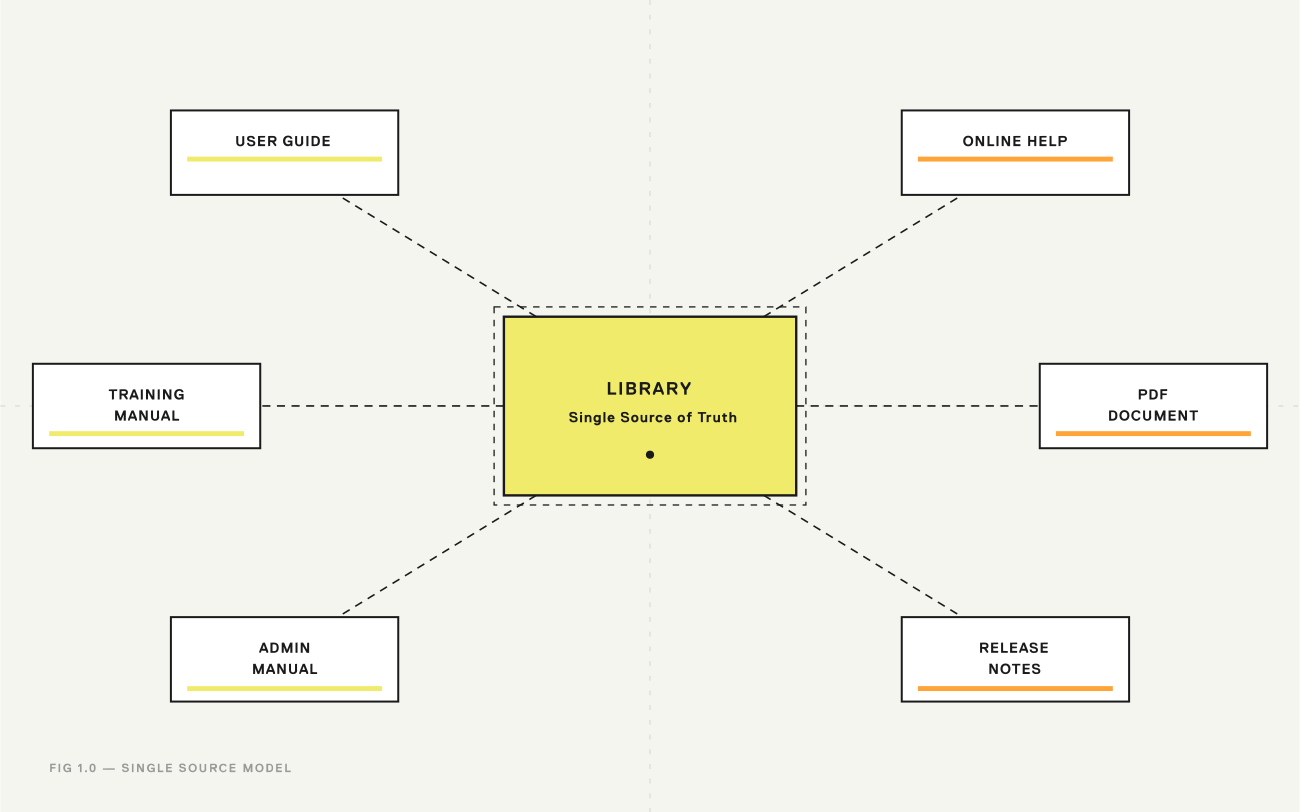
Author-it is built on an object-oriented, single-sourcing model. This means every content component exists as an independent object, created once and managed from a central repository. This object-oriented approach allows Author-it Cloud's different application modules (like Reviews and Translations) to manage content at a granular level, facilitating the entire lifecycle—from creation and review to translation and publishing—all from a single source of truth. When an object is updated in the central library, that change is automatically reflected everywhere the object is used, ensuring consistency and dramatically reducing maintenance overhead.
Key Terminology
Understanding the platform's core terminology is the first step toward strategic implementation. The following terms represent the foundational concepts of the Author-it Cloud ecosystem.
With these foundational concepts in mind, it becomes clear that before creating content, it is critical to first establish a robust architecture to manage it effectively.
2. Establishing a Scalable Content Architecture
A well-planned content architecture is the most critical prerequisite for successful, long-term content operations. Attempting to manage content without a clear structure for governance, organization, and lifecycle management inevitably leads to chaos. By establishing clear roles, permissions, a logical library structure, and defined workflow states before scaling content production, you create a resilient framework that ensures consistency and prevents content decay.
💡 Architecture first, content second. The single most common implementation mistake is scaling content production before governance is in place. Set up roles, folder structure, and release states before your authors write a single topic.
Role-Based Governance
Author-it Cloud uses a role-based system to manage user permissions and responsibilities throughout the content lifecycle. Understanding these roles is key to establishing clear governance.
Client Administrator: The architect of the system. This role is responsible for the highest-level administration, including creating and managing users, defining user groups, and controlling overall system access and subscriptions.Author: The primary content creator. Authors work within the full Author module, a feature-rich environment for developing, editing, and managing reusable content components. They are the core developers of the content repository.Contributor: A subject matter expert (SME) or occasional content provider. This role uses the simplifiedQuick-Editing Modeto contribute or update content without needing deep knowledge of the full authoring environment, ensuring that expertise can be captured efficiently without extensive training.
Library and Folder Strategy
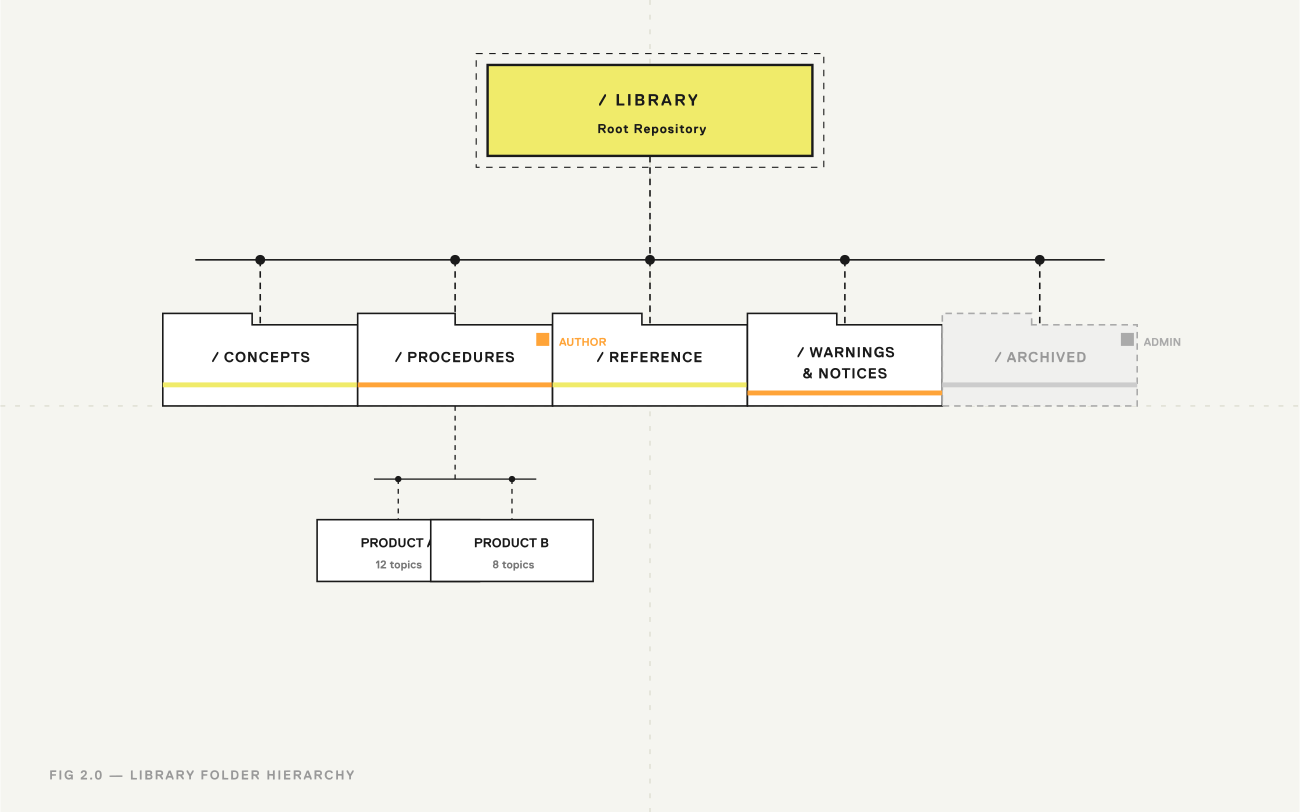
The primary mechanism for controlling content access and workflow is a combination of a logical folder structure and granular permissions. A well-organized library is not merely a storage system; it is an active governance tool. Best practice dictates creating a folder hierarchy that reflects your content's lifecycle, product lines, or content types. A content model-driven folder structure (e.g., /Concepts, /Procedures, /Reference) makes it far easier for authors to find and reuse the correct type of component.
Once this structure is in place, you can apply Folder Action Permissions to control which roles can perform specific actions (e.g., create, edit, delete, change release state) within each folder. This ensures, for example, that only designated editors can modify content in a Ready for Release folder, creating crucial checkpoints in your workflow.
Managing the Lifecycle with Release States
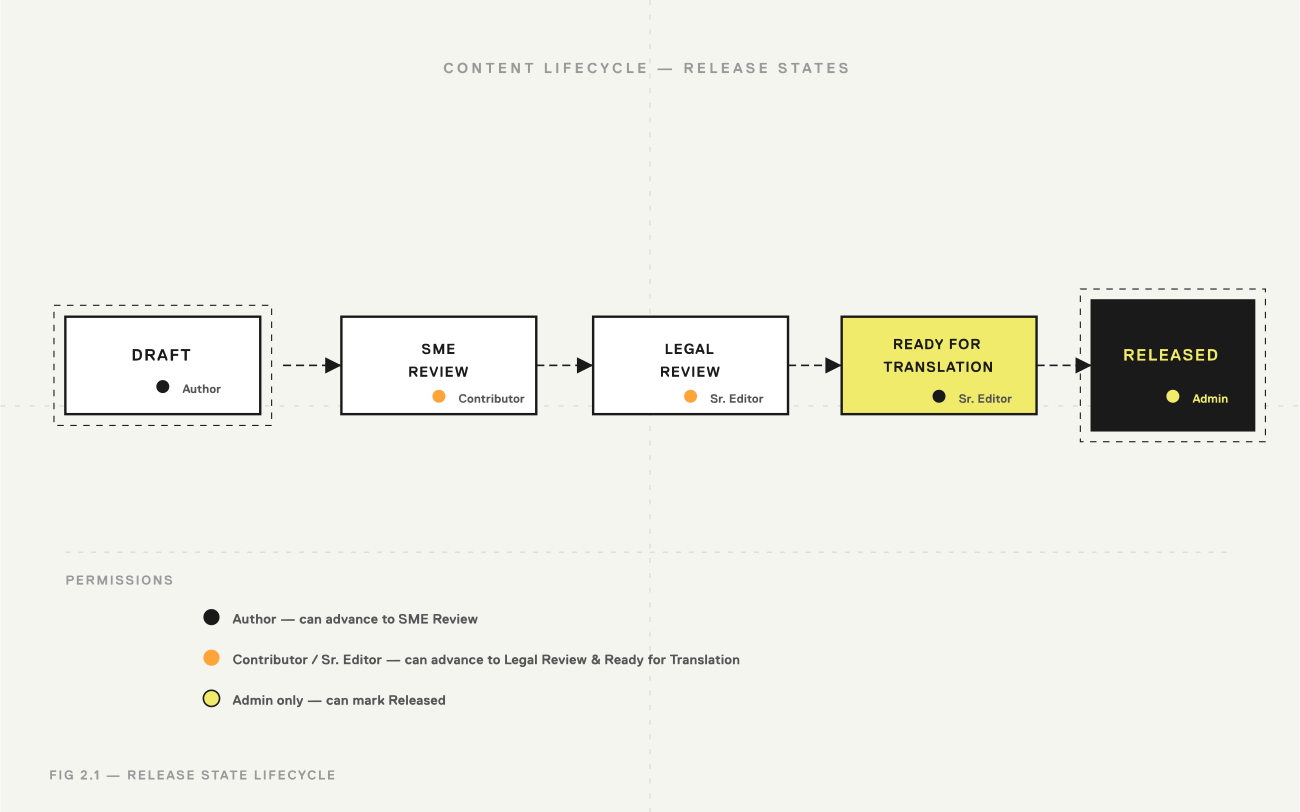
Release States are the core governance mechanism for an object's lifecycle. They provide auditable checkpoints and enable automated control over what content is permissible for review, translation, and final publication, thereby preventing premature or unapproved content from reaching customers. States like Draft, In Review, and Released provide at-a-glance visibility into the content lifecycle. The process for implementing this is straightforward:
- Define Custom Release States: Create release states that precisely match your organization's internal workflow (e.g.,
SME Review,Legal Review,Ready for Translation). - Assign State-Change Permissions: Within the folder permissions, assign roles the authority to change an object's state. For instance, an
Authormay be permitted to move a topic fromDrafttoIn Review, but only a Senior Editor can move it toReleased. - Apply States to Objects: As content moves through the development process, users apply the appropriate release state to signify its progress, providing clear status tracking and enabling workflow automation.
This architectural planning provides the essential structure. The next step is to master the practical application of creating and reusing content within that framework.
3. Mastering Content Reuse: The Object-Oriented Workflow
In Author-it Cloud, content reuse is not merely a feature; it is the core operational strategy. The business value is immense: it ensures absolute consistency across all publications, dramatically reduces authoring and translation time, and simplifies maintenance by centralizing updates. By treating content as a collection of reusable objects rather than a series of static documents, teams can build information products more efficiently and reliably.
The Building Blocks of Reuse
Success with reuse begins with a clear understanding of the primary content objects and their architectural roles.
Executing Reuse Strategies
With a library of well-defined objects, you can execute several powerful reuse strategies.
Component Reuse Across Publications
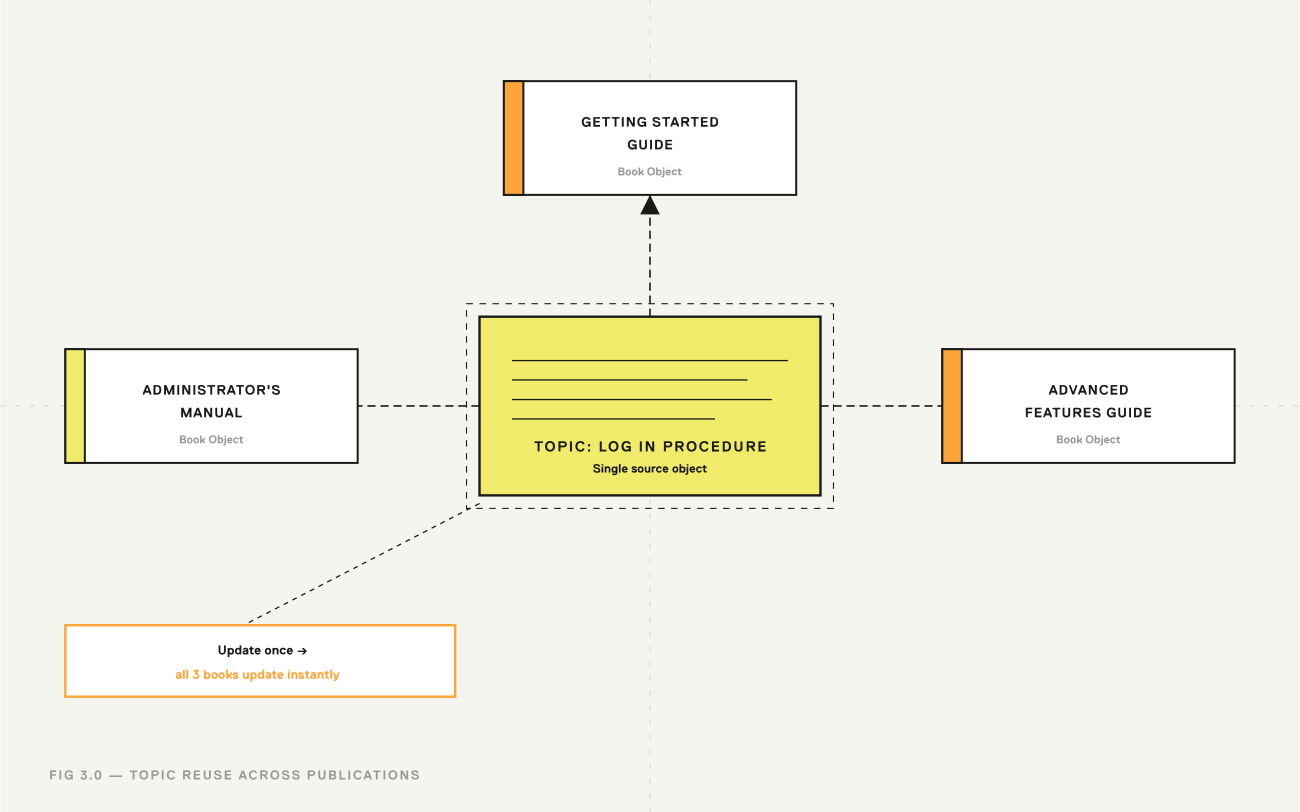
The most fundamental form of reuse is including the same Topic object in multiple Book objects. For example, a single topic explaining how to log into a system can be included in the "Getting Started Guide," the "Administrator's Manual," and the "Advanced Features Guide." If the login procedure changes, you only need to update the single source topic, and all three guides are instantly corrected.
Granular Reuse with Embedded Topics
For highly granular reuse, one topic can be embedded inside another "container" topic. This strategy is ideal for standard content fragments like legal disclaimers, technical notes, or safety warnings that must appear consistently within larger blocks of text. For instance, a complex multi-step procedure topic could embed a standard "Warning: High Voltage" topic at the appropriate step. As a best practice, authors should display paragraph markers in the editor to clearly visualize the boundaries of the embedded content and avoid accidental modification of the container topic.
While powerful, excessive nesting of embedded topics can create complex dependencies that are difficult to trace and maintain. Use this technique for discrete, stable content fragments like warnings or legal notices, not for long, complex sub-procedures.
Creating Navigational Tissue with Hyperlinks
The Hyperlink object is a reusable component that creates the navigational connections within and between your publications. Its behavior intelligently adapts to the output format. In online outputs like Help systems or web pages, it generates a standard hypertext jump. In print formats like PDF or Word, the same object automatically generates page number cross-references (e.g., "See page 24") or footnotes, ensuring that all cross-references are accurate and contextually appropriate without manual intervention.
Mastering these reuse techniques ensures that your content is consistent. The next step is to ensure that the reusable content itself conforms to a consistent internal structure.
4. Implementing a Structured Authoring Workflow
While content reuse ensures consistency between publications, structured authoring enforces deep consistency within content components. It is the mechanism that makes topics truly interchangeable and reliable at scale. Structured authoring goes beyond surface-level formatting to control the very sequence and type of content allowed within a topic, guaranteeing that all content of a certain type (e.g., a procedure) adheres to the exact same information model.
💡 Structured authoring isn't a creative constraint — it's quality control that runs itself. Authors get real-time feedback; editors spend less time fixing inconsistencies.
Planning for Structure
Implementing structured authoring requires careful planning. A successful conversion from unstructured to structured content typically follows these key steps:
- Analyze Existing Content: Systematically review your existing books and topics. Group them into distinct, logical "types" such as procedures, concepts, references, and troubleshooting guides.
- Standardize Layouts and Styles: For each content type you identified, define a standard information model. Determine the required content elements (e.g., title, short description, steps, result) and their required order and frequency.
- Enable Structured Templates: Within Author-it, convert your standard topic templates into structured templates. This enables the
Structure Builder, where you will define the rules that enforce your information models.
Developing Structure Rules
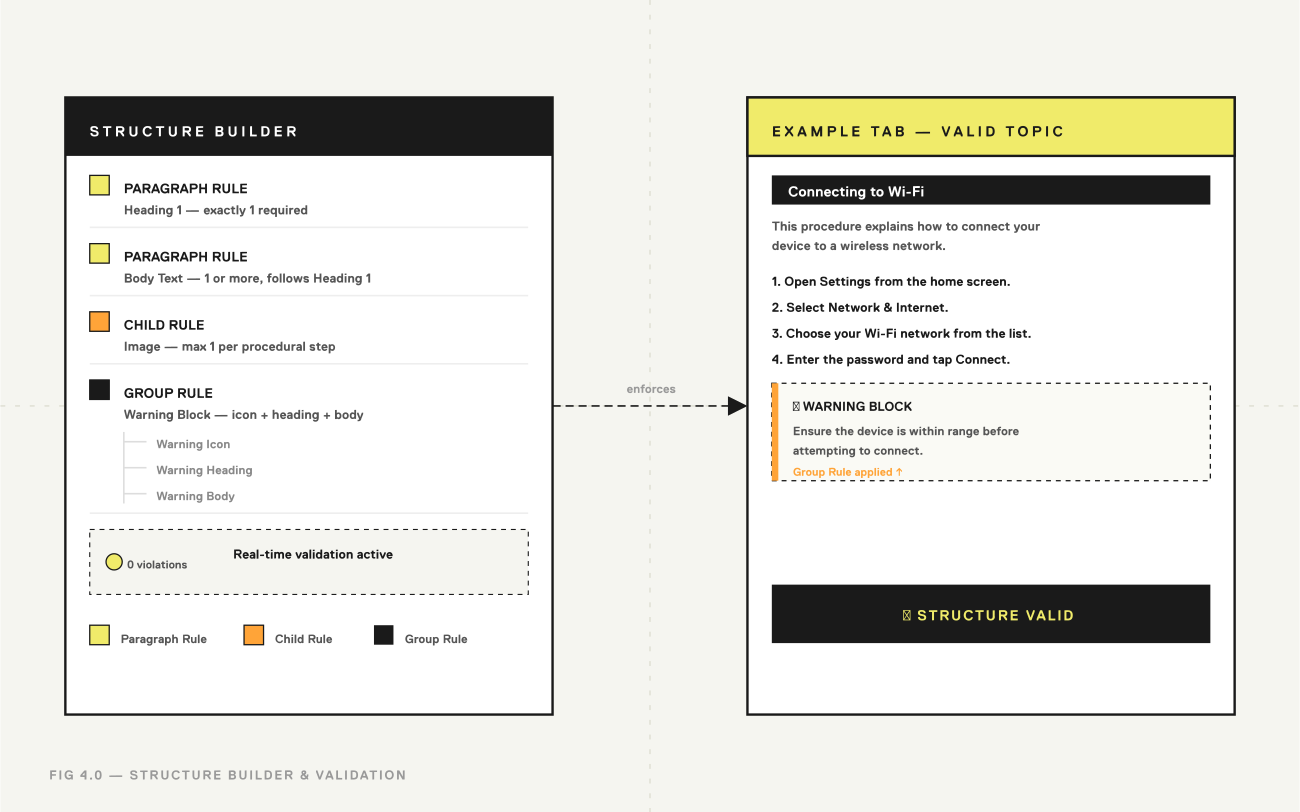
The Structure Builder is the tool used to translate your content models into enforceable rules for a given topic template. These rules ensure that authors adhere to the predefined structure as they create content. The primary types of rules include:
Paragraph Rules: These are the most fundamental rules. They define which paragraph-level styles are permitted in a topic, their required sequence (e.g., aHeading 1must be followed by aBody Textparagraph), and their frequency (e.g., exactly oneHeading 1is allowed).Child Rules: These rules govern inline content within a paragraph. For example, a child rule can specify the number of allowed images within a procedural step or restrict the types of hyperlinks permitted in a warning note.Group Rules: These allow you to define a sub-structure around a collection of other rules. This is useful for managing complex or repeating patterns, such as a "warning block" that consists of a specific icon, a heading, and a paragraph, which can then be managed as a single, reusable unit within the larger topic structure.
The Authoring and Validation Process
For an author, working in a structured environment provides clear guidance and immediate feedback. The authoring interface includes a Rules tab, which displays the required structure, and an Example tab, which must be configured to show a model of a perfectly structured, valid topic. This provides authors with an unambiguous blueprint for success.
As the author writes, the system provides real-time validation. If the author attempts to add a paragraph in the wrong order or use a disallowed style, the system immediately flags the content as a violation. For the topic to be considered valid and progress in its lifecycle, the author must correct all violations, ensuring 100% conformance to the defined structure.
This level of control ensures consistency. The next challenge is to systematically manage necessary variations in content.
5. Managing Content Variation with Variants
While consistency is paramount, most documentation requires controlled variation to address different products, regions, audiences, or software versions. A robust variant strategy is a form of architectural governance that prevents the content chaos caused by uncontrolled "save-as" and "copy-and-paste" workflows. Author-it's variant management framework provides a robust solution to handle these differences efficiently from a single source.
💡 If your team is managing variation through "save as" or copy-paste, you're creating a future maintenance problem. The variants framework is how you handle all of that from a single source - without the chaos.
The Variant Framework
The variant system is built on a few core concepts that allow for precise control over content variations.
Primary Object: This is the default or base version of an object (e.g., a topic or a book) that exists in a publication's structure.Variant Object: This is a specific variation of the primary object. It is created as a copy of the primary and then modified to contain the specific content needed for a particular condition.Variant Criteria: These are the "tags" or metadata that define the conditions under which a variant object is used instead of the primary. A criterion consists of a category and a value (e.g., Criterion:Product, Value:X2001).Single-Selectvs.Multi-SelectCriteria: Variant criteria can be configured to meet different needs. Single-select criteria allow only one value to be applied (e.g., a product can only be modelX2001orX3001). Multi-select criteria allow multiple values to be applied, which is useful for content that applies to several conditions (e.g., a feature available inUSA,Canada, andMexico).
Workflow for Creating and Managing Variants
The process for managing content variations is systematic and follows a clear workflow:
- First, an administrator establishes the necessary
Variant Criteriaand their possible values (e.g., Criterion:Region, Values:NA,EMEA,APAC). - Next, an author creates a Variant from a
Primary Object. The system generates a copy of the object, which can then be safely modified without affecting the original. - Then, the author assigns the appropriate
Variant Criteriavalues to the new variant object, "tagging" it for its specific use case.
Filtering and Publishing Variants
Generating a targeted output is a two-part process. First, within the Book Editor, authors use the Filter function to select a set of criteria and preview what the final publication will look like for that specific combination. This allows for real-time validation of the variant logic. Second, when ready to publish, these same criteria are selected in the Publishing dialog to generate the final, targeted output, ensuring that only the correct primary and variant objects are included.
Advanced Strategies for Variant Management
Fall-back Paths
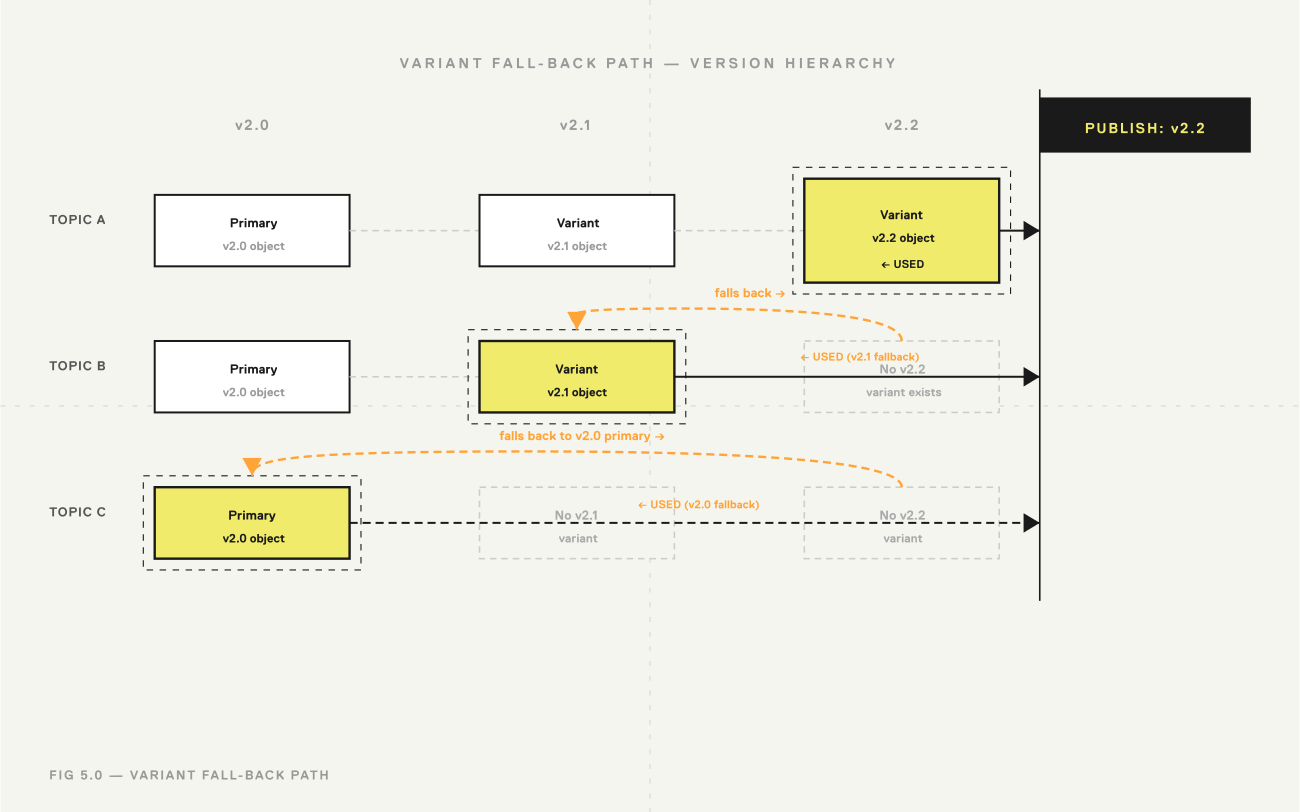
Fall-back paths are a powerful strategy, especially for versioned documentation like software releases. By structuring criteria values in a hierarchy (e.g., v2.2 falls back to v2.1, which in turn falls back to v2.0), you create an intelligent publishing system. When you publish for v2.2, the system will first look for a v2.2 variant. If one doesn't exist, it will automatically "fall back" and use the v2.1 variant, and so on. This ensures that the most relevant content is always published, even if a specific variant for the selected version hasn't been created, preventing content gaps in your documentation.
Resolving Conflicts with Variant Priority
When an object could match multiple variant criteria, conflicts can arise. To govern this, administrators must assign a priority number to each Variant Criterion (e.g., Product = 1, Region = 2). This priority dictates which rule wins in case of a conflict. For instance, if content is filtered by both Product and Region, and an object has variants for each, the criterion with the lower priority number (e.g., Product = 1) will take precedence. This crucial governance feature ensures predictable and consistent publishing outcomes.
With these core authoring practices established, we can now connect them to the broader content lifecycle of review, translation, and final delivery.
6. Integrating Workflows into the Content Lifecycle
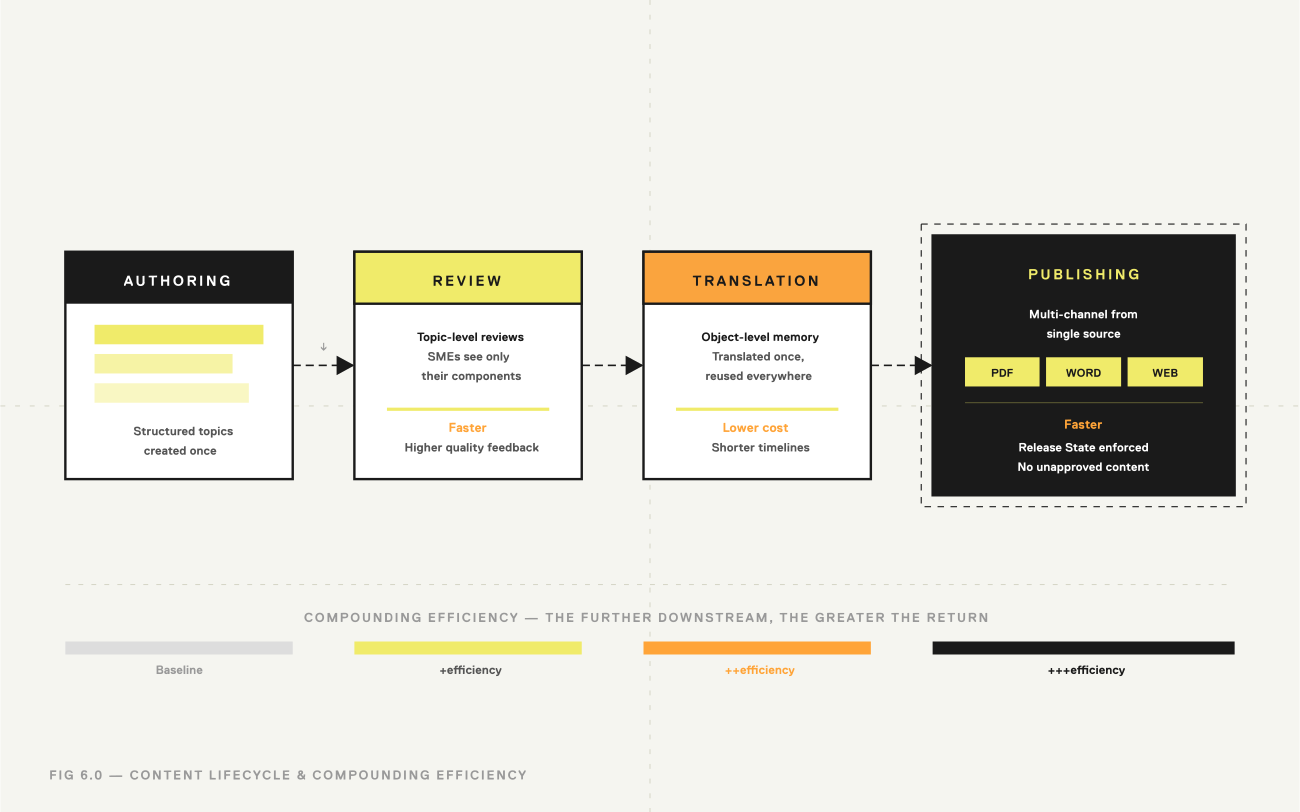
The true power of a component content strategy is realized when its principles streamline downstream processes. The initial investment in creating structured, reusable, and variant-managed content pays significant dividends in the subsequent review, translation, and publishing stages of the content lifecycle. These stages become faster, more accurate, and more cost-effective.
Streamlining Content Reviews
The component-based approach fundamentally changes the nature of content review. Instead of circulating entire documents, the Reviews module centers the process on individual Topic objects. The value proposition is clear: Subject Matter Experts (SMEs) are asked to review only the specific components that require their expertise. A legal expert reviews only the disclaimer topics, and an engineer reviews only the technical procedure topics. This makes the review process faster, more focused, and less burdensome on contributors, leading to higher quality feedback and quicker turnaround times.
Optimizing the Translation Workflow
Author-it's object-oriented model revolutionizes the traditionally expensive and time-consuming translation process. The Translations module manages translation jobs at the object level, not the document level. The key benefit is component-level translation memory: if a topic has been translated once, that translation is stored and automatically reused every time that topic appears in a translation job. This is significantly more efficient and cost-effective than traditional document-level translation memory, as it drastically reduces the volume of content sent to external translators, which in turn lowers costs, shortens project timelines, and ensures linguistic consistency.
Achieving True Multi-Channel Publishing
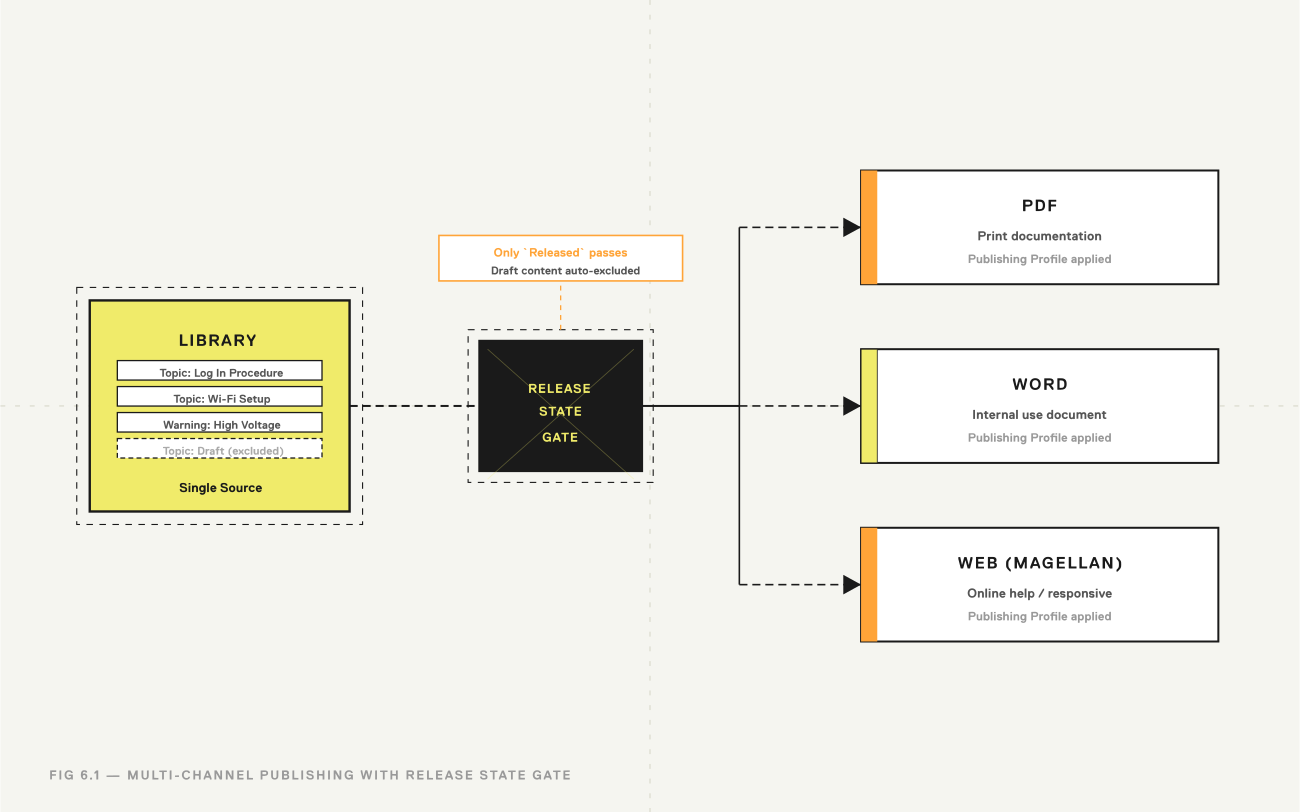
Single-source publishing is the culmination of this entire strategy. The Publishing Profiles module is the engine that transforms a single set of source objects into multiple, distinct output formats - such as PDF for print, Word documents for internal use, and responsive Magellan websites for online help - all from the same source content.
The same single source can also publish to AION, Author-it's structured JSON output for AI - so the content you govern here is ready for LLMs and RAG pipelines without a separate rebuild.
Furthermore, publishing profiles provide a final, critical governance checkpoint. Filters within a publishing profile can be configured to enforce specific Release States. For example, a profile for customer-facing documentation can be set to only include content that has been marked as Released. This creates an automated safeguard that prevents draft or unapproved content from ever being accidentally included in a final publication, ensuring quality and compliance.
Conclusion: Key Principles for Scalable Content Operations
Successfully implementing a modern content strategy with Author-it Cloud requires more than learning features; it demands a shift in mindset. The principles outlined in this handbook provide a blueprint for moving from traditional, document-focused habits to a more agile, scalable, and efficient component-based operation. Adhering to these core principles will unlock significant returns in content quality, consistency, and operational efficiency.
- Think in Components, Not Documents — Every piece of information should be evaluated for its potential as a reusable, self-contained object. Deconstruct your content into its smallest logical chunks to maximize reuse and flexibility.
- Architect Before You Author — The most critical investment is in planning. Establish a robust folder structure, clear user roles, and a defined content lifecycle with release states before beginning large-scale content creation. A solid architecture prevents content chaos and is the foundation for scalability.
- Structure for Consistency and Scale — View structured authoring not as a creative constraint, but as a strategic enabler. Enforcing a consistent information model is the key to ensuring content is uniform, interchangeable, and truly ready for reliable reuse across any context.
- Manage Variation Systematically — Use the variants framework as the sole method for handling content differences across products, regions, or versions. This eliminates the significant risks and inefficiencies of manual copy-paste workflows and ensures that all variations are managed from a single source of truth.
- Leverage the Full Lifecycle — Remember that the benefits of a component-based approach extend far beyond the initial authoring phase. The upfront effort creates compounding efficiencies in downstream processes, making review, translation, and multi-channel publishing faster, cheaper, and more reliable.
Ready to go further?
- Explore Author-it →
- See how Author-it helps Manufacturing, Software and Utilities →
- Book a demo →
Authored by:

Adrian Winks, CEO, Author-it

Published on March 5, 2026
Author-it Cloud FAQ
Q: What's the difference between Author mode and Quick-Editing Mode?
A: Author mode is the full-featured environment for experienced content developers — it supports complex authoring, architecture management, structured templates, and advanced object workflows. Quick-Editing Mode is a simplified browser-based editor designed for subject matter experts and occasional contributors who need to provide or update content without deep platform training.
Q: How does Author-it Cloud reduce translation costs?
A: Author-it manages translation at the object level, not the document level. When a topic has been translated before, that translation is stored in component-level memory and reused automatically in future jobs — across any publication that includes it. This reduces the volume of net-new content sent to translators, lowering cost, shortening timelines, and ensuring consistent terminology across languages.
Q: What are Release States, and why do they matter?
A: Release States track where an object is in its content lifecycle — for example, Draft, In Review, Ready for Translation, or Released. They create auditable checkpoints and can be configured so that only authorised roles can advance content to the next state. Publishing Profiles can also be set to only include Released content, preventing unapproved material from ever reaching customers.
Q: What's the difference between a Primary Object and a Variant?
A: A Primary Object is the default version of a topic or book. A Variant is a copy of that primary, modified for a specific condition — a different product model, region, or software version. Variants are tagged with Variant Criteria so the publishing engine knows when to use them instead of the primary. This lets you manage multiple versions of content from a single source without duplicating entire documents.
Q: Can subject matter experts contribute content without disrupting the authoring structure?
A: Yes. Contributors use Quick-Editing Mode, which provides a clean, simple interface for adding or updating content without interacting with the full Author module, structured templates, or folder permissions. This keeps the authoring environment clean while still capturing expertise from across the business.
Q: What happens if I try to publish content that hasn't been approved?
A: If your Publishing Profile is configured to enforce Release States — which is recommended best practice — any content not marked as Released will be automatically excluded from the output. No manual gatekeeping required.
Q: How is Author-it Cloud different from a traditional CMS or document management system?
A: A traditional CMS or DMS manages documents as whole files. Author-it Cloud manages content at the component level — every topic, image, and file is an independent object that can be created once and reused across any number of publications. This is the fundamental difference that enables consistent, scalable content operations at enterprise scale.
Q: Does structured authoring work for all content types?
A: Structured authoring is most valuable for content that follows repeatable patterns — procedures, reference material, troubleshooting guides, conceptual overviews. The key is to analyse your content types first, define the information models that make sense for each, and apply structure where it delivers the most consistency benefit.
Published on:
Author:
March 5, 2026
Jamie Simmonds
Documentation Manager
Related Resources
Article
How to prevent AI hallucinations in enterprise content
A practical five-step playbook to prevent AI hallucinations in enterprise content - by fixing the content your AI reads, not the model.
Article
Content drift: what it is and how to prevent it
Why your PDF, help centre, and AI assistant give different answers - and how single-sourcing prevents content drift for good.

Article
What is enterprise AI infrastructure?
The layers of enterprise AI infrastructure - and why the content layer, not compute, decides whether your AI is accurate.