Article
Auto parts manufacturers still using InDesign

Why it matters:
Auto parts manufacturers using InDesign for technical documentation face a growing gap between print-first tooling and the multi-channel, multi-market reality they operate in.
Summary:
Adobe InDesign is a world-class layout tool. It was not built to manage structured technical documentation across product lines, markets, and channels. Auto parts manufacturers using it as their primary documentation system are doing expensive manual work that a CCMS handles automatically - and taking on compliance risk that InDesign's file-based model doesn't address.
InDesign is excellent at what it's for
Let's be clear about what InDesign is. It's one of the best page layout tools ever built. For a graphic designer producing a product catalog that needs to look exactly right on a printed page, it's the right tool.
The problem isn't InDesign. The problem is using a page layout tool as the content management system for a manufacturing documentation function. Those are different jobs, and one tool can't do both well.
Auto parts manufacturers end up in this situation because the documentation started as print - parts catalogs, dealer guides, installation sheets. InDesign produced good-looking output. Then digital came along, then global markets, then regulatory requirements, then multiple product lines with shared components, then someone asked whether the AI field service tool could use the documentation as its source. And InDesign was still in the middle of all of it, doing a job it was never designed for.
What InDesign-based documentation actually costs
The cost of InDesign-centric documentation isn't visible on a single invoice. It accumulates in labour time, in errors that reach the field, and in opportunities that require documentation infrastructure you don't have.
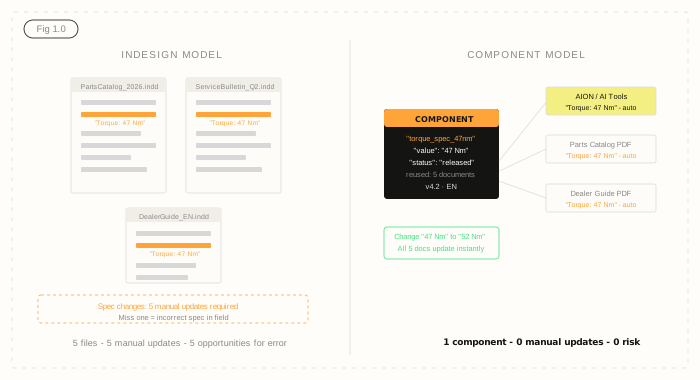
Every product update requires a designer to open the InDesign file, locate the relevant sections, make the change, export, and redistribute. If the same specification appears in five documents - a parts catalog, an installation guide, a dealer training manual, a service bulletin, and a compliance document - that's five separate manual updates. Miss one and an incorrect spec is in the field.
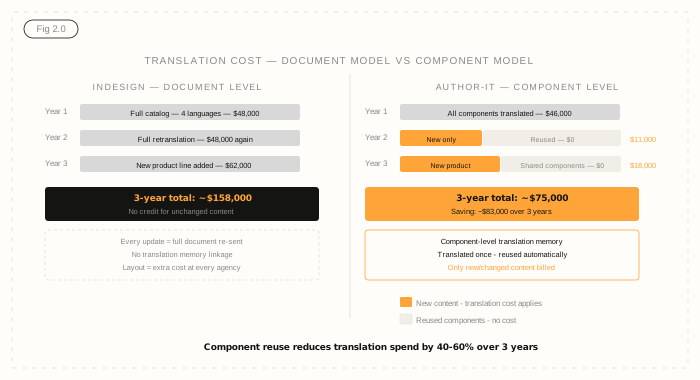
Translation is where the cost becomes genuinely significant. InDesign files don't connect to translation memory. Every translation is a fresh exercise. A 200-page parts catalog translated into four languages, updated twice a year, costs what it costs each time - with no credit for content that hasn't changed. Over three to five years, that translation overhead for a mid-size auto parts manufacturer is typically in the hundreds of thousands of dollars.
Then there's digital. InDesign's primary output is print-optimised PDF. Producing HTML5 web help, interactive parts browsers, or structured data for dealer portals requires significant additional effort. Many manufacturers end up with a separate set of processes for digital output, running in parallel with the InDesign print workflow - doubling the maintenance burden.
The multi-channel problem InDesign can't solve
Modern auto parts documentation needs to exist in multiple forms simultaneously. A parts catalog. A dealer portal. A field service app. An OEM-specific technical document. An aftermarket version with different part numbers. A regulatory submission. All of them current, all of them accurate, all of them using the same underlying content.
InDesign works at document level. You build a document, export it, distribute it. There's no mechanism for ensuring that a specification referenced in three different documents is actually the same specification - just three copies of a text string that need to be manually kept in sync.
Component content management works differently. Content is stored at component level - a specification, a warning, an installation step - and then assembled into documents at publish time. Change the component and every document that references it updates. OEM and aftermarket versions can draw from the same base content with conditions applied to include or exclude the relevant sections. Digital and print outputs publish from the same source.
Compliance and traceability - where InDesign falls short
Automotive supply chain documentation increasingly operates under formal compliance requirements. ISO 9001 certification requires documented control of document versions, approval workflows, and evidence that current documents are in use in the field. IATF 16949 adds further requirements for automotive-specific quality management documentation.
InDesign has no native version control beyond file naming conventions and whatever version tracking your team has agreed to apply. Approval workflows are managed externally - typically by email, sometimes by a shared spreadsheet. Demonstrating to an auditor that the correct version of a procedure was approved by the right person and in use on a specific date is an exercise in archaeology.
Author-it's release state model makes compliance traceable by design. Content exists in defined states. Approval is recorded in the system. Published output can only contain released content. An auditor asking for evidence of version history and approval on a specific document gets a system-generated audit trail, not a reconstructed narrative.
How the transition works in practice
The question most auto parts documentation managers ask is: what happens to everything we have in InDesign?
The answer is that existing InDesign content migrates into Author-it as structured components. Product descriptions, specifications, warnings, part numbers, installation steps - these become components in the system. InDesign templates become output templates in Author-it, so the visual quality of the output is preserved. The difference is that the content is now structured and managed, not locked into page layout files.
The migration is a project - typically three to six months for a manufacturer with a substantial content library. During that window, teams often run in parallel - migrating historical content while new content is authored in Author-it from day one. By the end of the migration, the InDesign workflow is retired, and the documentation function is running on a content management system that was actually built for the job.
The AI content angle
This matters increasingly for manufacturers piloting AI tools. Field service apps, dealer chatbots, and internal support tools all need reliable product content to function accurately. InDesign PDFs are notoriously difficult to parse reliably - the layout structure interferes with content extraction, metadata is minimal, and there's no indication of content freshness or approval state.
Author-it's AION output - structured JSON introduced in 2026.R1 - gives AI systems exactly what they need: clean, structured, governed content with metadata indicating source, type, version, and approval state. The same content that produces your parts catalog also feeds your AI tools. Without any additional work by the documentation team.

Auto Parts Documentation FAQ
Q: Why is Adobe InDesign so common in auto parts manufacturing documentation?
A: InDesign became the default for many manufacturers because it produces high-quality print output - catalogs, part sheets, and dealer guides. When documentation teams were primarily focused on print, it was a reasonable tool. The problems emerge when the same content needs to be maintained across multiple product lines, updated regularly, published digitally, or localised for different markets.
Q: What happens to our existing InDesign files when we move to Author-it?
A: InDesign files can be migrated into Author-it as structured components during the implementation phase. The content - product descriptions, specs, warnings, part numbers - is extracted and structured into reusable components. Existing layouts become output templates. The migration is handled as a project, not a manual re-keying exercise.
Q: How does Author-it handle the catalog and parts book format that InDesign produces?
A: Author-it publishes to PDF from structured templates - so the visual output can match or exceed what InDesign produces, while the underlying content is structured and single-sourced. Part numbers, specs, and descriptions live in the system once and are assembled into the correct catalog format at publish time. Layout rework is eliminated.
Q: Can Author-it manage part number variables across thousands of SKUs?
A: Yes. Variables in Author-it allow product-specific values - part numbers, dimensions, torque specs, compatible models - to be defined once and referenced throughout the content. Change a part number in one place and every reference updates automatically. This is one of the primary cost-reduction mechanisms for high-SKU auto parts manufacturers.
Q: How does structured content help with OEM and aftermarket documentation differences?
A: Author-it's variant publishing and conditional content features allow the same base content to produce OEM and aftermarket versions from a single source. Sections that differ between channels are flagged with conditions and included or excluded at publish time - without maintaining two separate sets of documents.
Q: What compliance requirements does Author-it help meet for auto parts manufacturers?
A: Author-it's release state management and audit trail support ISO 9001 compliance requirements common in the automotive supply chain. Content cannot be published without going through the defined approval workflow. Every version is logged. This is critical for warranty documentation, safety data sheets, and regulatory submissions in markets like the EU and US.
Q: How long does implementation typically take for an auto parts manufacturer?
A: Implementation timelines depend on content volume and the complexity of the existing environment. A typical auto parts manufacturer with established InDesign templates and a large content library should plan for a three to six month implementation, including content migration, template development, and team training. Author-it's professional services team works through this process with customers.
Published on:
Author:
May 29, 2026
Quinn Wright
Head of Sales
Related Resources

Article
How to prevent AI hallucinations in enterprise content
A practical five-step playbook to prevent AI hallucinations in enterprise content - by fixing the content your AI reads, not the model.

Article
What is enterprise AI infrastructure?
The layers of enterprise AI infrastructure - and why the content layer, not compute, decides whether your AI is accurate.

Article
Content lock-in: the exit tax nobody budgets for
The cost of leaving a content platform rarely makes the business case - until you try to switch. Here is the exit tax, and how open output removes it.